How we picked (and what we verified)
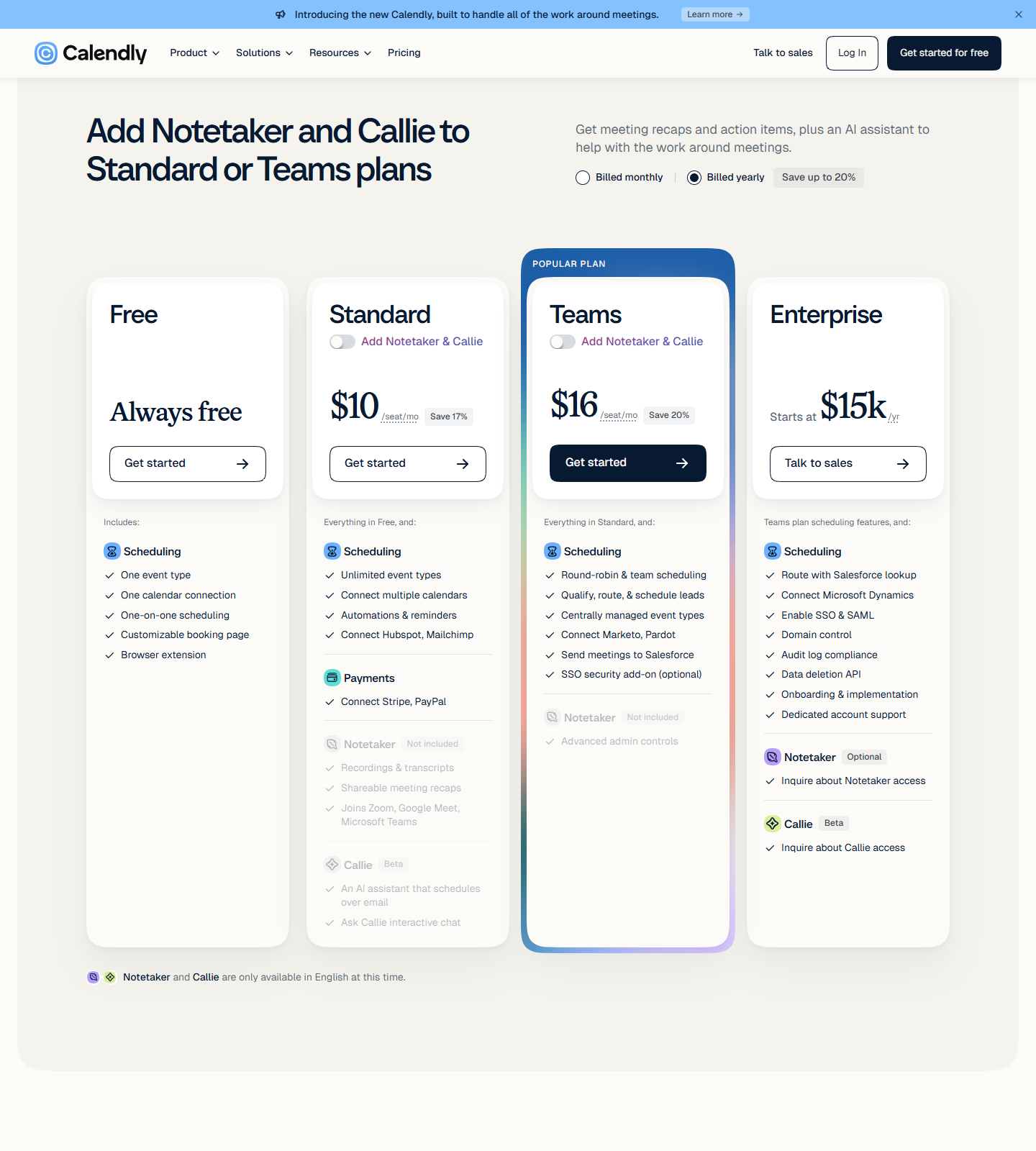
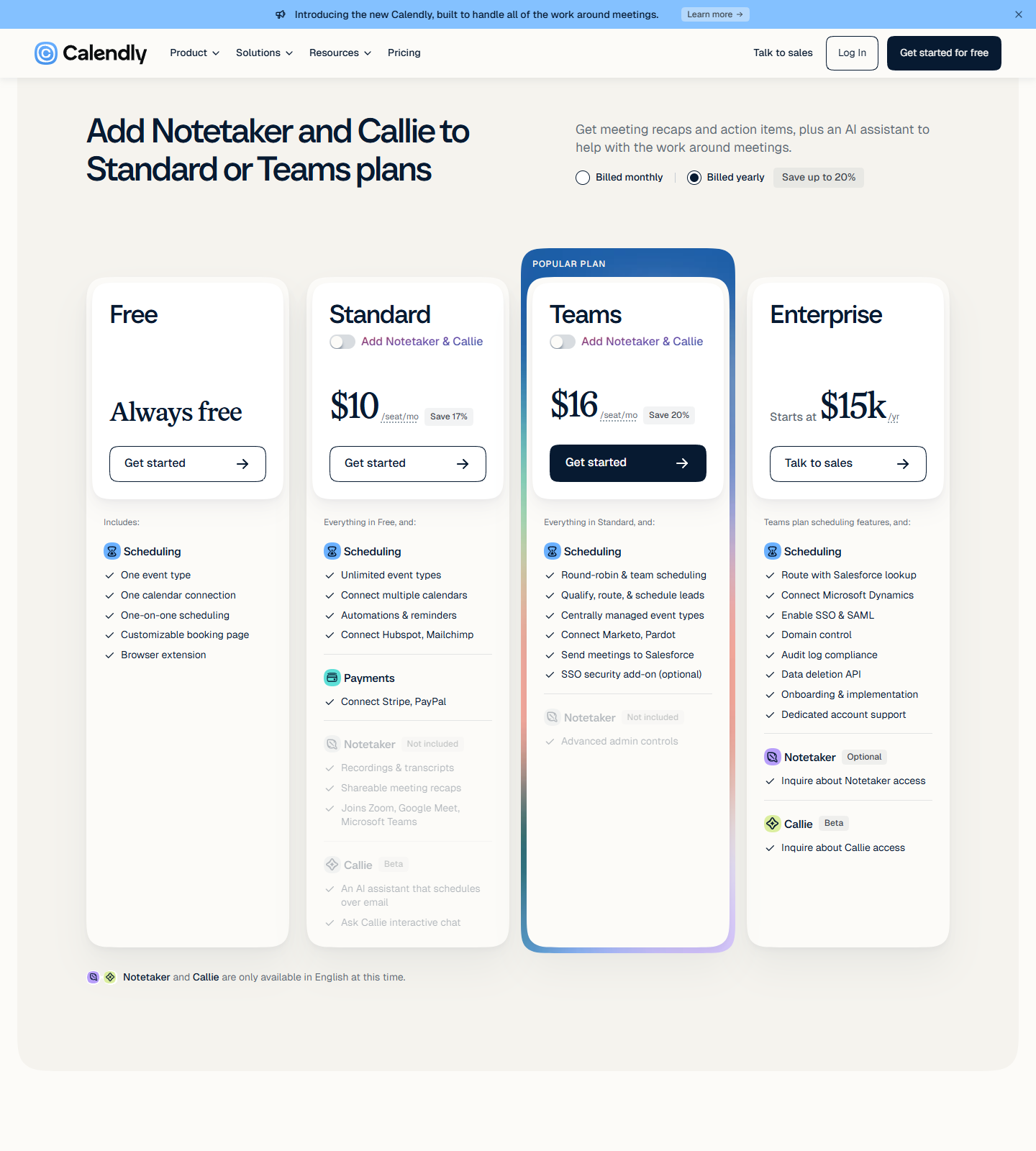
Baseline: our own hands-on Calendly free-plan run — event published, public page booked, invitation email with reschedule and cancel links, cancellation synced back to the owner timeline. The free plan we booked through is described by Calendly, in the pricing page we captured on 2026-10-16, as “…Always free… One event type… One calendar connection… One-on-one scheduling… Customizable booking page… Browser extension.” That is the bar every alternative below is measured against.
Everything on this page is a terms comparison: each number comes from the vendor’s own pricing page, captured on the date shown under each screenshot. We did not create accounts, and no tool here gets a hands-on badge. Where a plan matrix is rendered behind a toggle, we clicked the real toggle and captured both states rather than trusting the default view.
| Tool | Free plan (as published) | Cheapest paid step | How we checked |
|---|---|---|---|
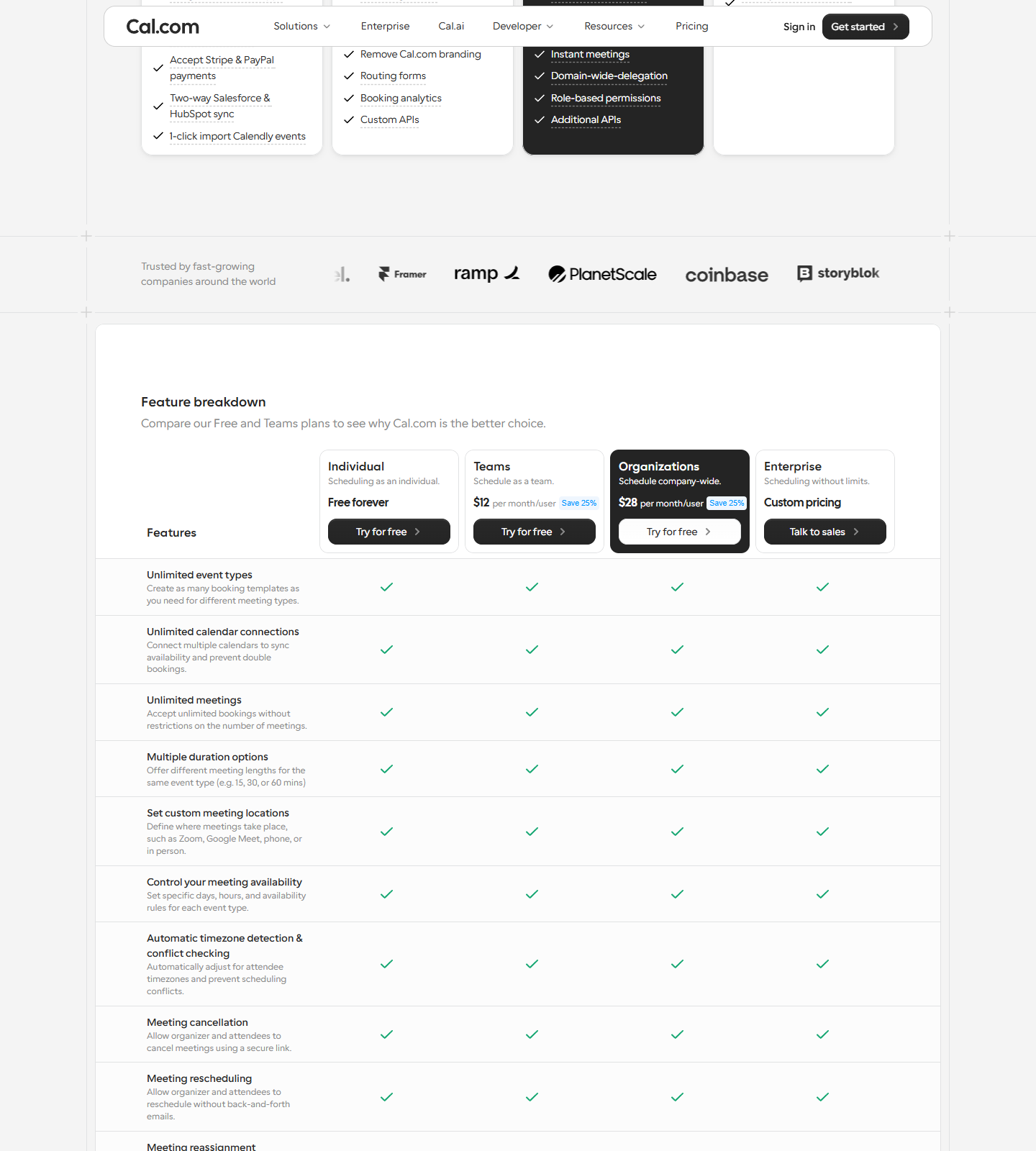
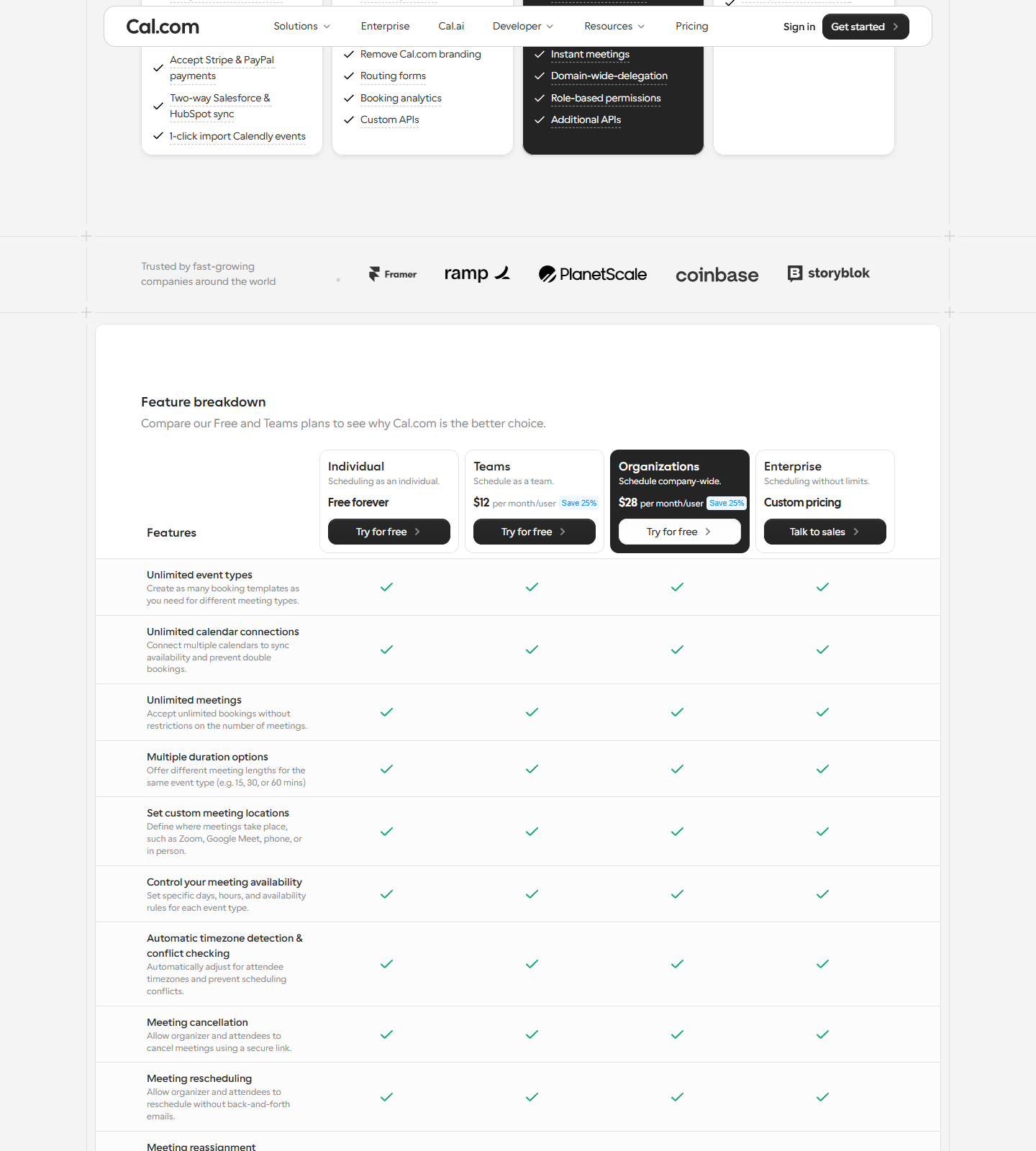
| Cal.com | Free forever: 1 user, unlimited event types & calendars, email & SMS notifications, mobile app + browser extension, Stripe & PayPal payments, two-way Salesforce & HubSpot sync, 1-click import of Calendly events | Teams $12/user/mo billed yearly (Organizations $28) | Page captured 10-16, zero drift vs 10-15, 10-13 and 09-29 + our hands-on test log for the free product |
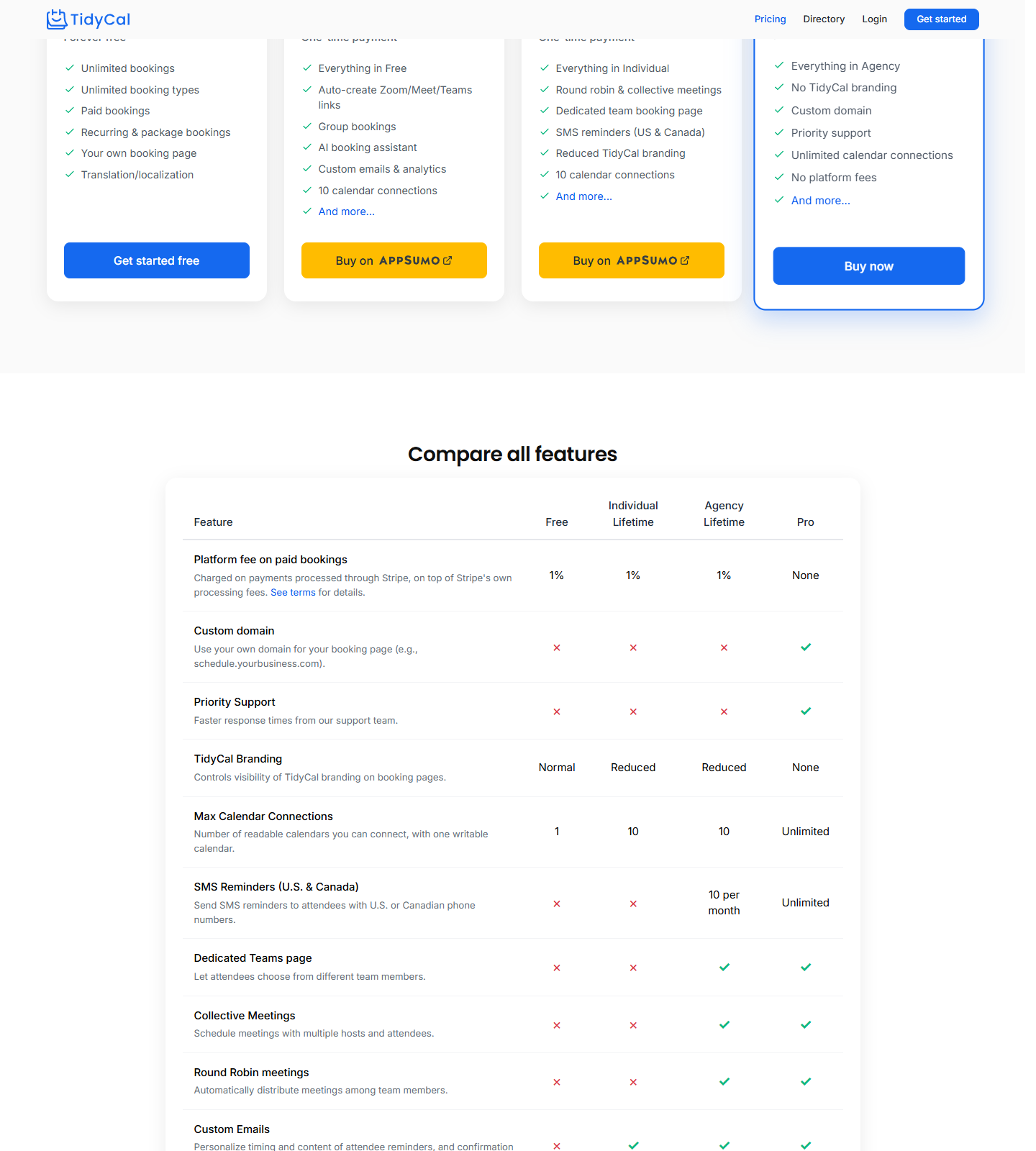
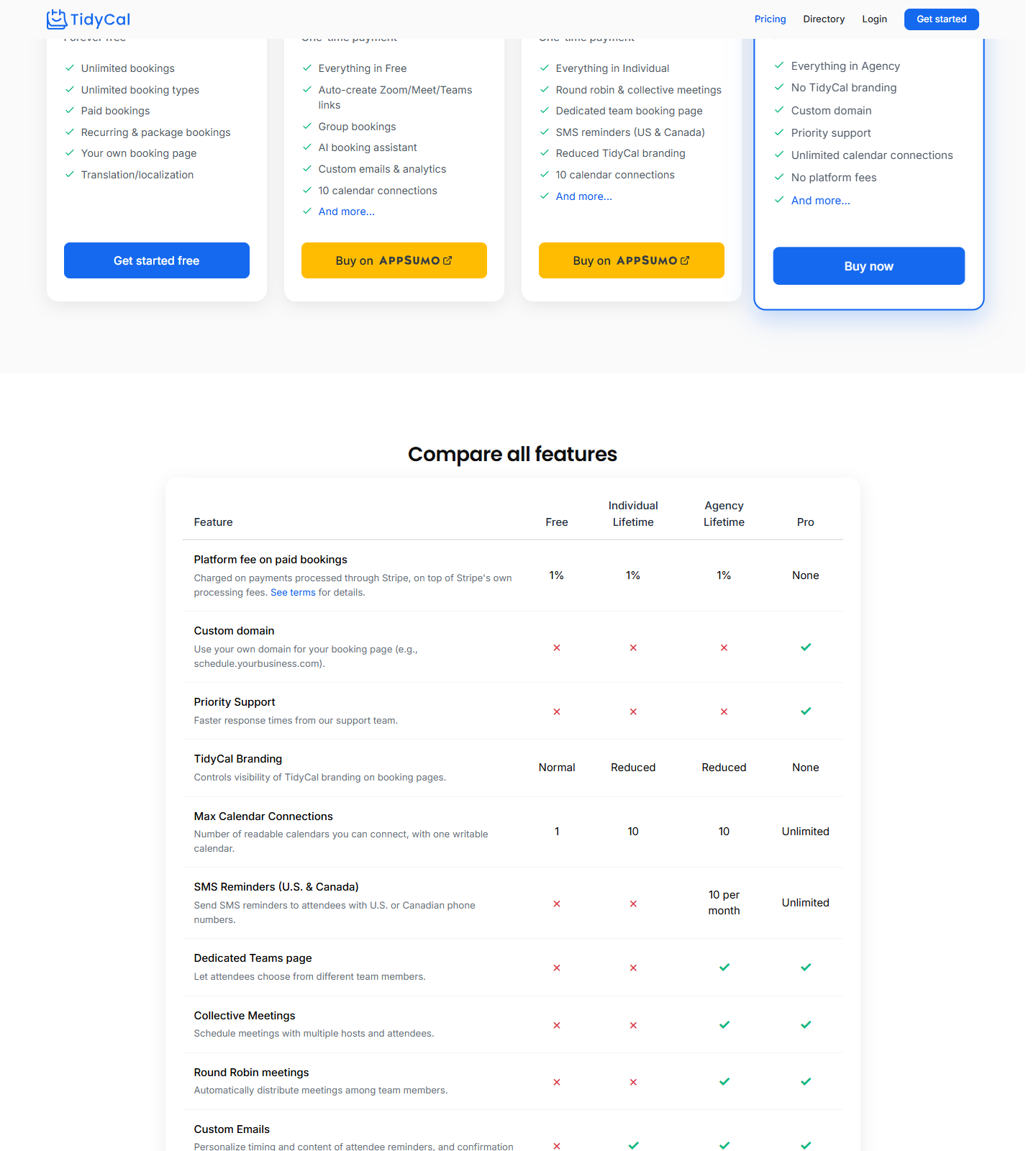
| TidyCal | $0 forever: unlimited bookings, unlimited booking types, paid bookings via Stripe/PayPal with a 1% platform fee, recurring & package bookings, date polls, 1 calendar connection, built-in Calendly importer | Individual Lifetime $29 one-time (AppSumo), or Pro at $12/mo — $99/yr ($8.25/mo annualized) | Page + pricing FAQ captured 10-16, zero drift vs 10-15 |
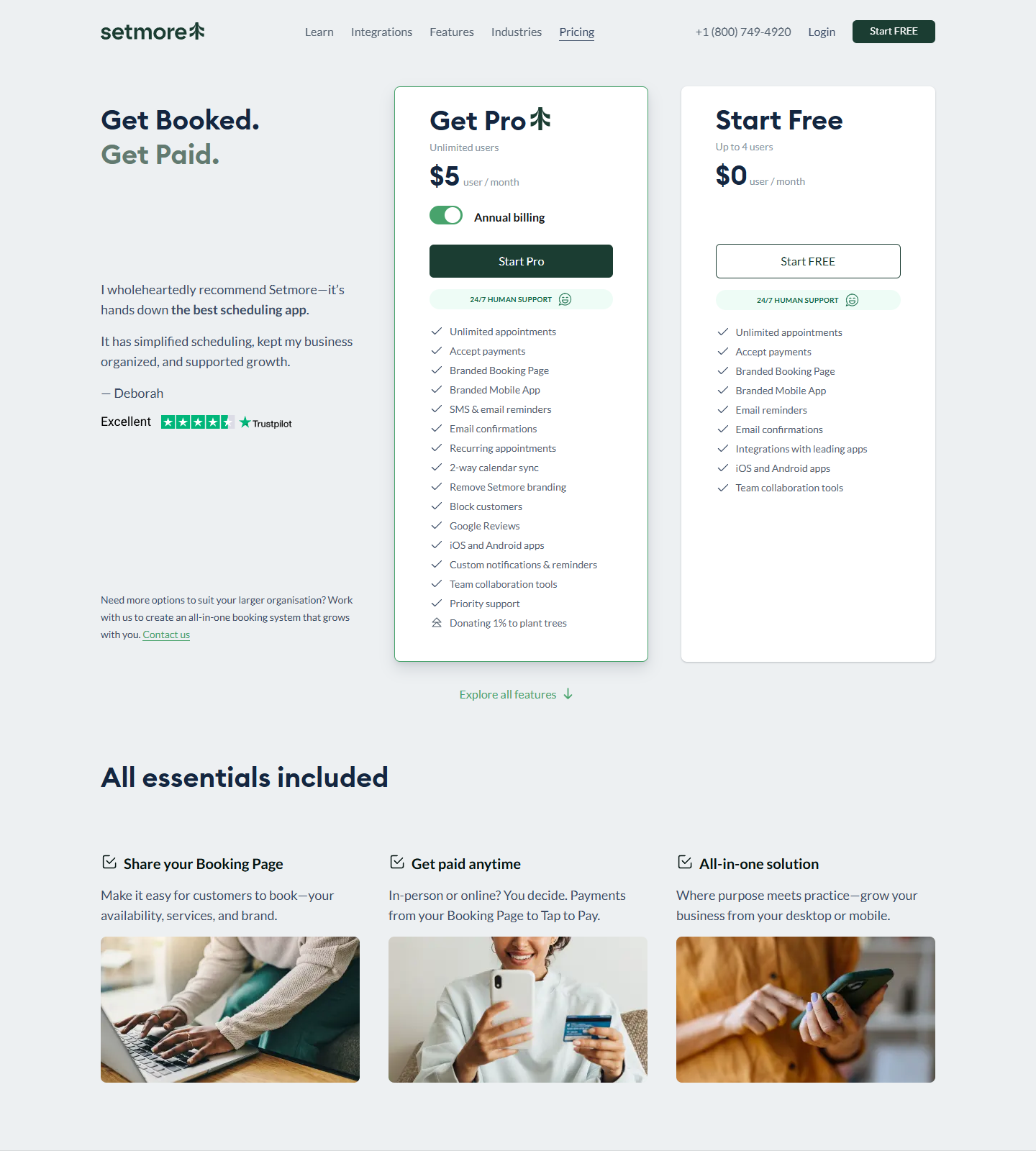
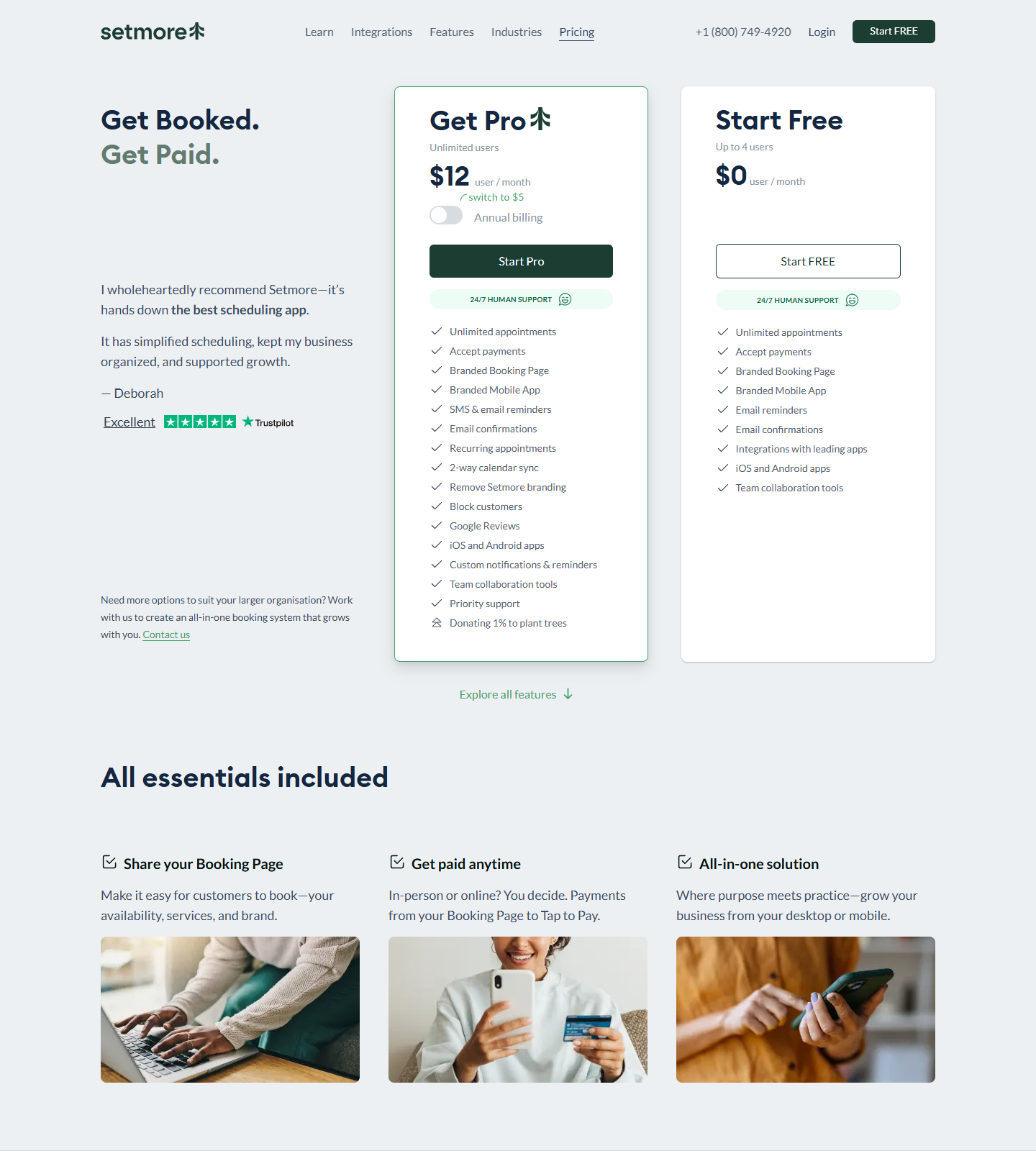
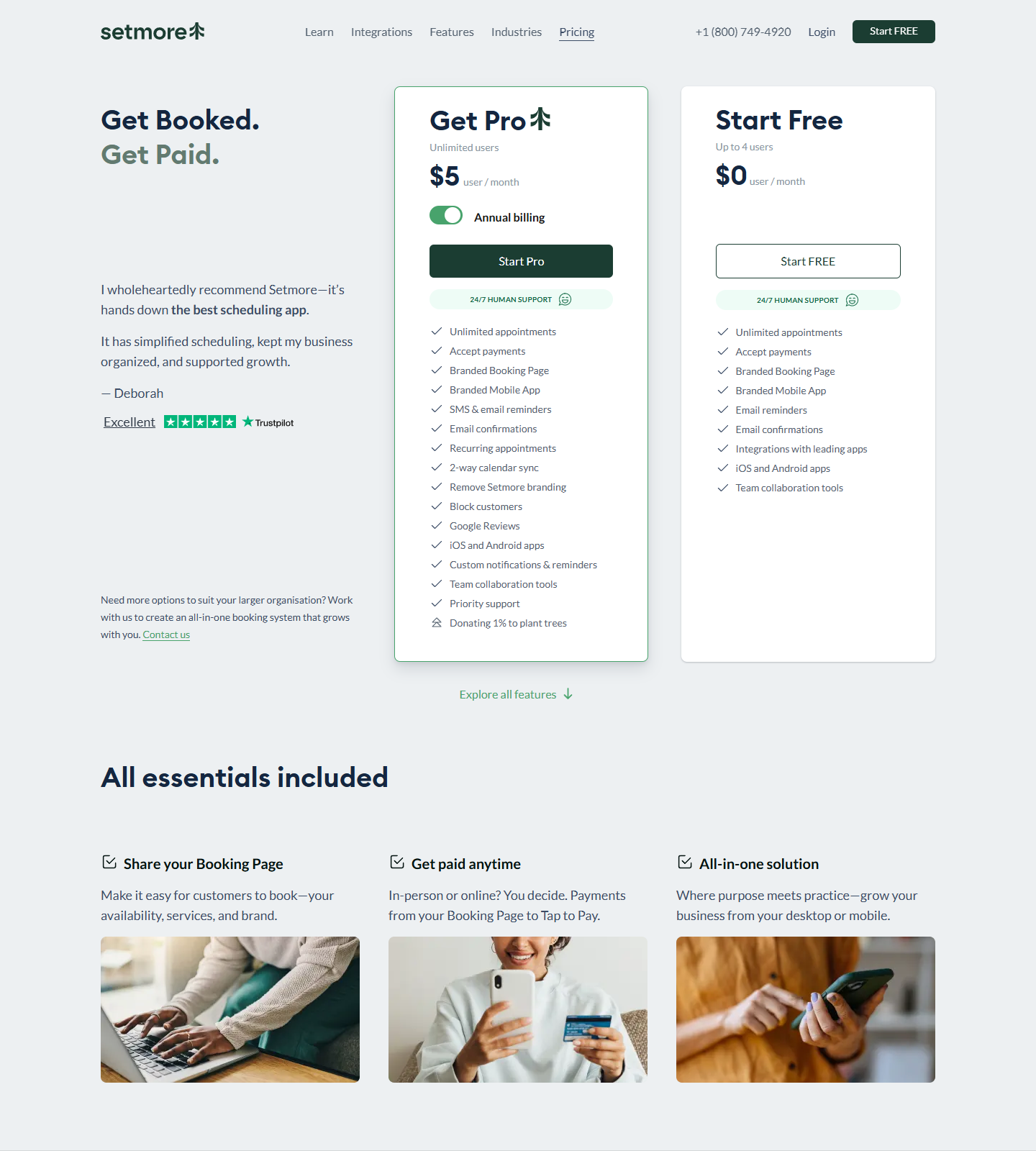
| Setmore | Free $0: up to 4 users, unlimited appointments, payments accepted, branded booking page and mobile app, email reminders — but 2-way calendar sync: No and SMS reminders: No | Pro $5/user/mo annual; the same card reprints at $12/user/mo in the monthly state | Page captured 10-16 in both states (real click on the billing switch), zero drift vs 10-15, 10-14 and 10-13 |
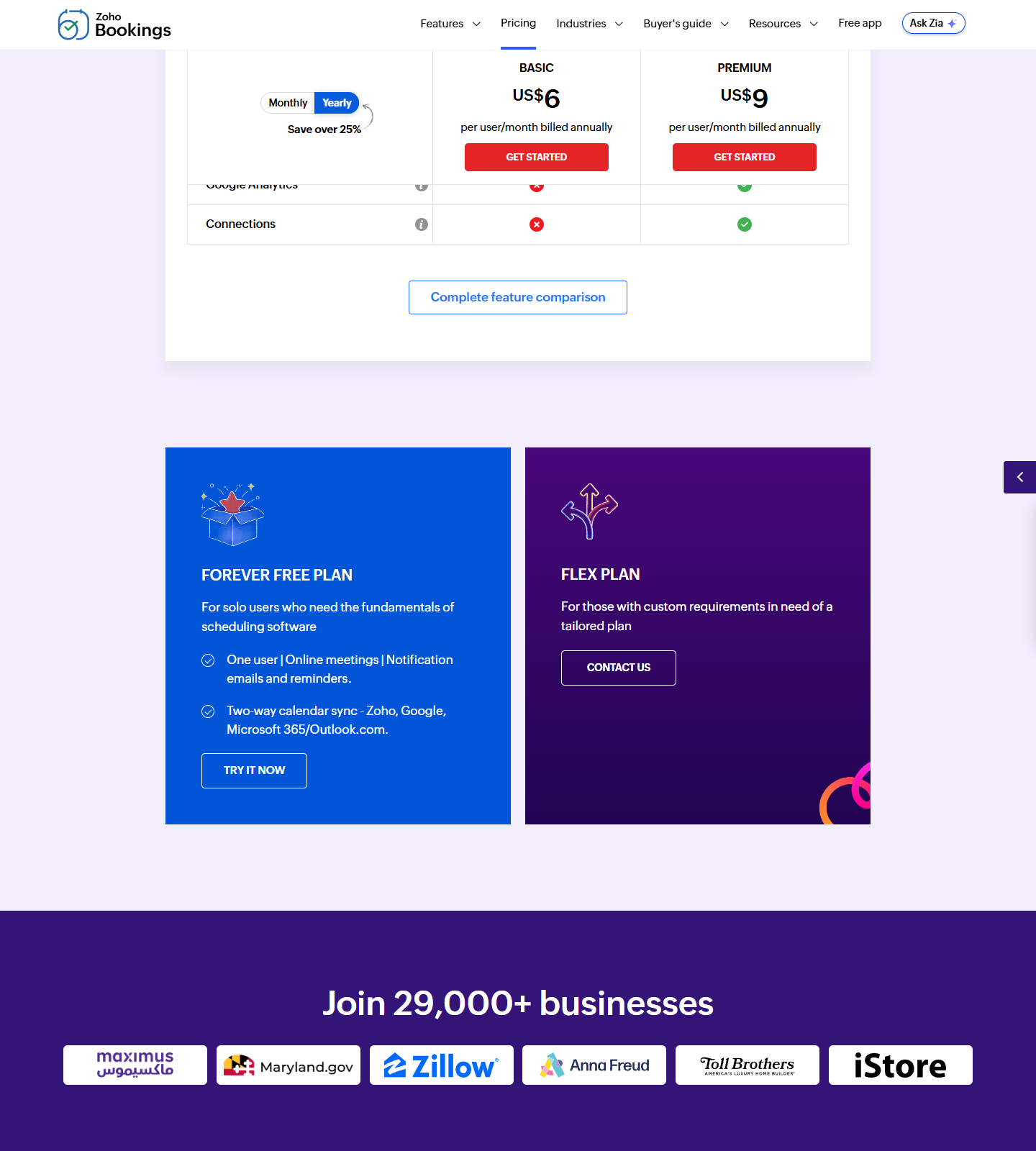
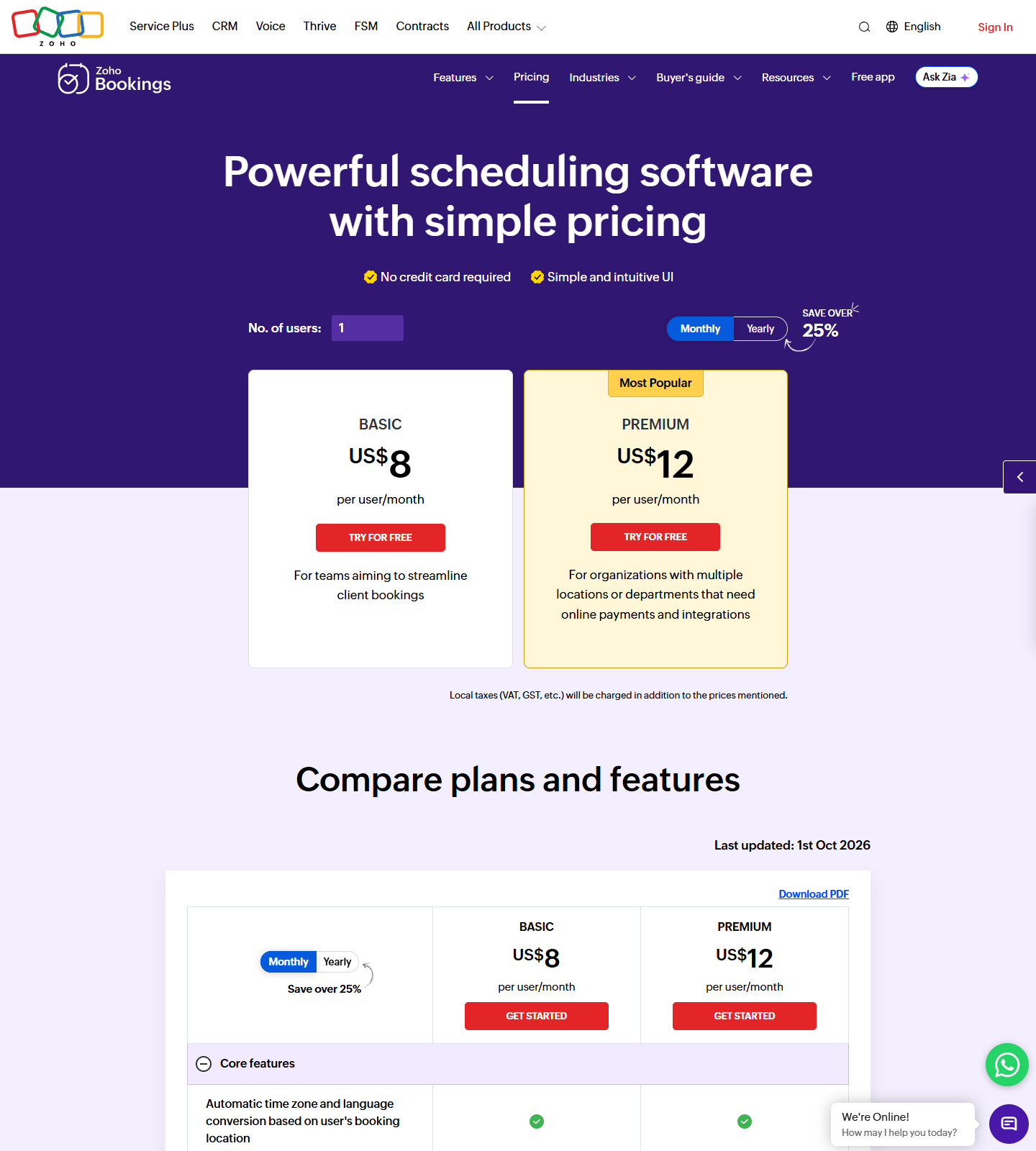
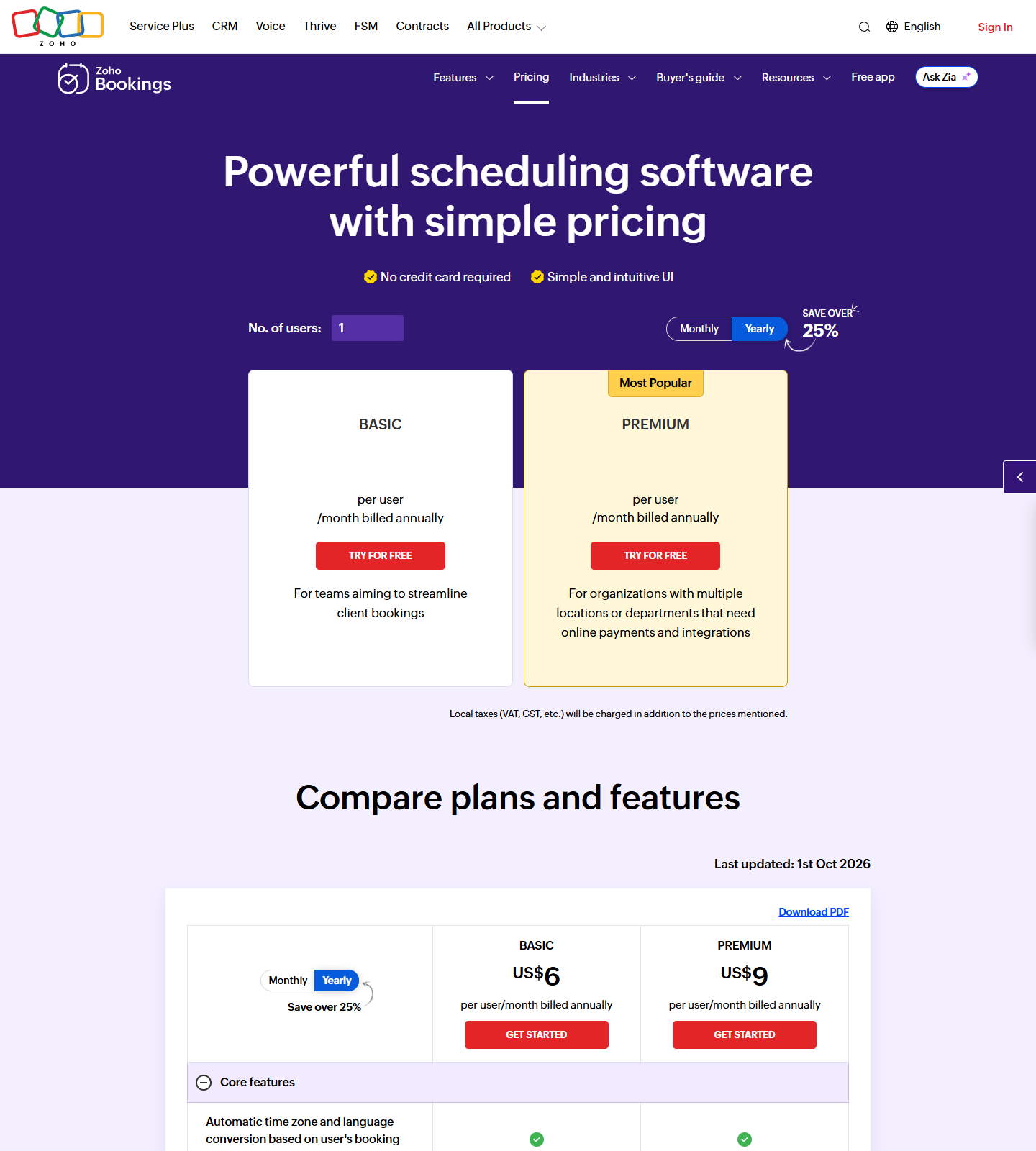
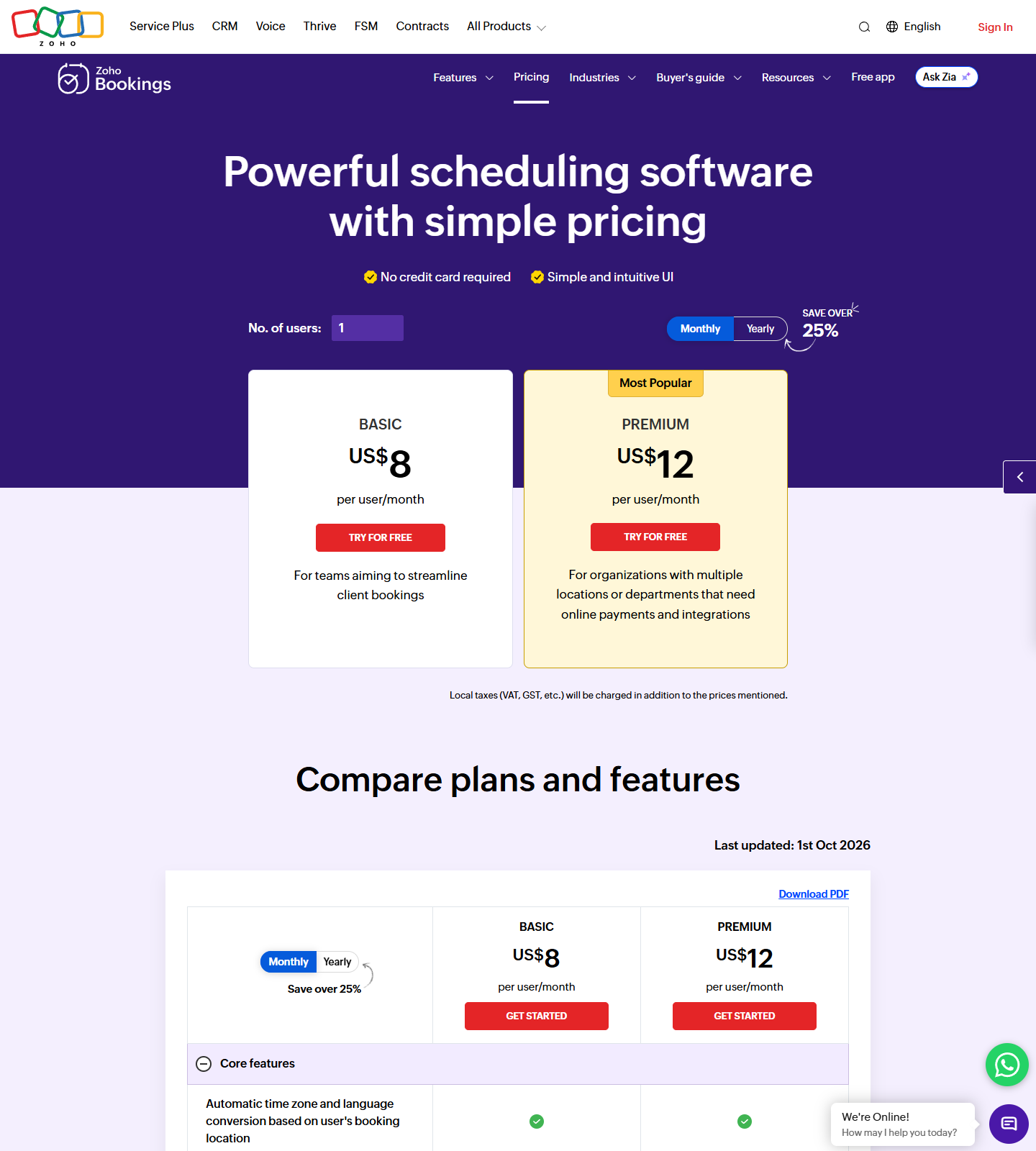
| Zoho Bookings | FOREVER FREE PLAN: one user, online meetings, notification emails and reminders, two-way calendar sync — Zoho, Google, Microsoft 365/Outlook.com, no credit card required | BASIC US$6/user/mo billed annually — US$8 in the monthly state | Page captured 10-16 in both states (real Monthly click); vendor prints its own “Last updated: 1st Oct 2026” |
Quick takes
Cal.com is the closest thing to a straight upgrade. Its free plan removes the two walls Calendly’s free plan is built on — One event type, One calendar connection — and prints “Unlimited event types & calendars” for a single user at $0, plus payments (Stripe, PayPal), Cal Video and email plus SMS notifications. The detail that matters most if you are already on Calendly: the free feature list includes “1-click import Calendly events”, so the migration is a button, not a rebuild. Paid starts at Teams $12/user/month billed yearly. Free-tier mechanics and the wider stack are in our Cal.com review and Cal.com alternatives page.
TidyCal is the one-time-payment answer. Its FAQ states verbatim: “The Free plan is $0 forever and includes unlimited bookings, unlimited booking types, paid bookings through Stripe and PayPal, recurring and package bookings, date polls, your own booking page and one-click translation. It connects 1 calendar. Payments taken on this plan carry a 1% platform fee, on top of Stripe’s own processing fees.” So free gets you unlimited booking types and payments, but the same single-calendar ceiling Calendly’s free plan has. Two switching notes: the FAQ also confirms “TidyCal has a built-in Calendly importer that brings your Calendly event types over as TidyCal booking types”, and the 1% fee follows you onto the $29 and $79 lifetime tiers — only the $99/yr Pro subscription drops it. The fee-versus-seat break-even math and the AppSumo refund clock are in TidyCal vs Calendly.
Setmore is the only row that gives you four seats for $0 — Calendly charges $10/seat/month for the second seat — and its free column keeps unlimited appointments, payments and a branded booking page and app. Read the plan matrix before switching, though: on the same page the Free column prints “2-way calendar sync: No” and “SMS reminders: No”, with recurring appointments also Pro-only. If your Google or Outlook calendar is the source of truth, Setmore free is a functional downgrade from Calendly free even with three extra seats. Pro is $5/user/month on annual billing ($12 monthly), which recovers sync and removes Setmore branding. One caveat we keep repeating: the billing switch’s screen-reader summary line names a team tier (“team $5” annual, “team $9” monthly), but the page renders only two cards, so we quote no team price from four consecutive captures.
Zoho Bookings is the pick if your calendar lives in Microsoft 365. Its free plan is framed as “FOREVER FREE PLAN — For solo users who need the fundamentals of scheduling software”: one user, online meetings, notification emails and reminders, and two-way calendar sync with Zoho, Google and Microsoft 365/Outlook.com — no credit card required. That is broader calendar coverage than Calendly’s free single connection. The paid ladder is also the cheapest per-user upgrade here: US$6/user/month billed annually (US$8 monthly) for BASIC, US$9 (US$12 monthly) for PREMIUM. We checked the discount claim by arithmetic: the two published pairs are exactly 25% apart (6 vs 8, 9 vs 12), while the banner reads “SAVE OVER 25%” — the saving is real, the “over” is marketing. Two footnotes from the same page: the US$ prices are pre-tax (“Local taxes (VAT, GST, etc.) will be charged in addition to the prices mentioned”), and the vendor’s own reference date is printed at the bottom — “Last updated: 1st Oct 2026”.
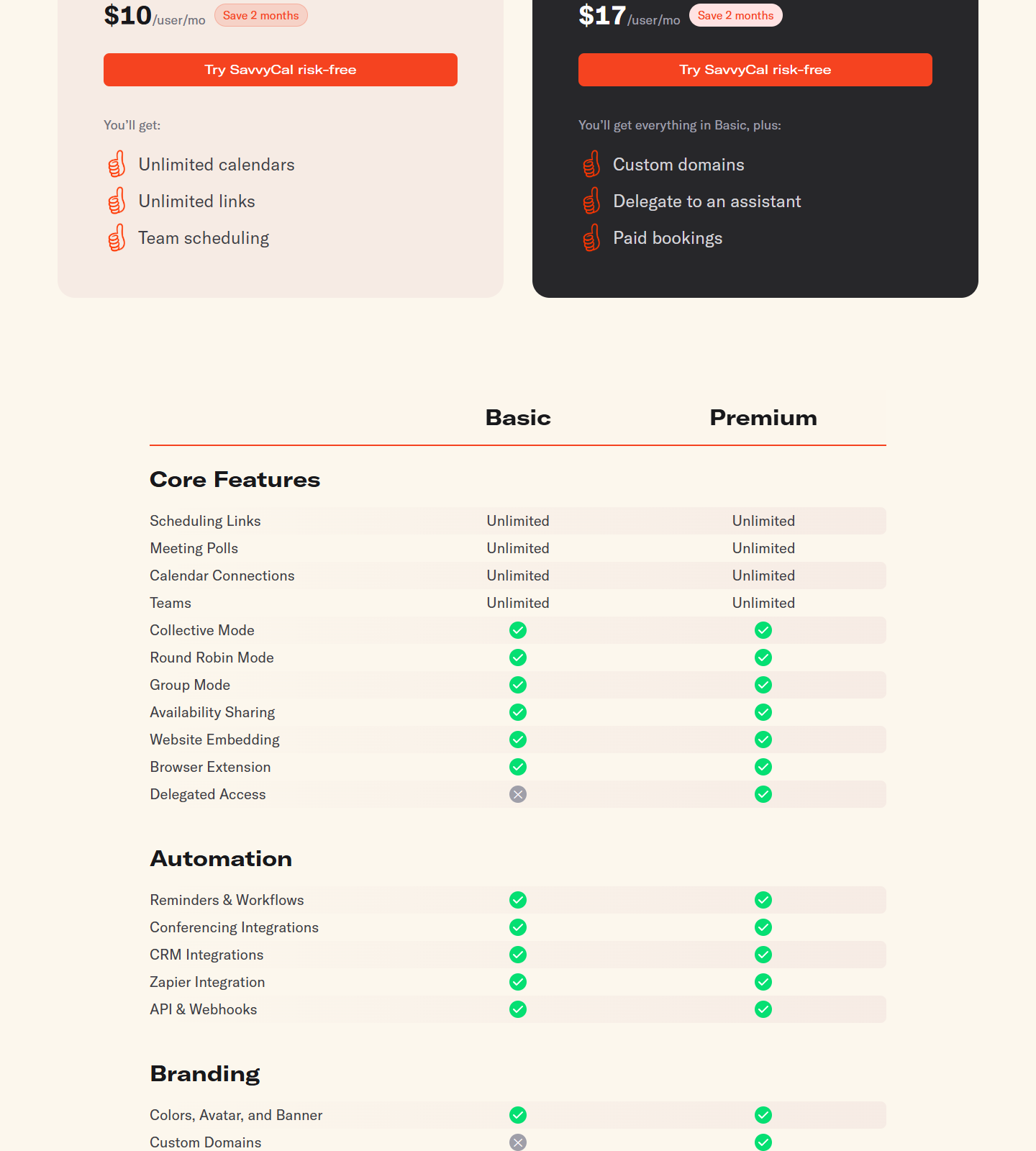
ZenCal — a favourite of ours in earlier rounds — is still deliberately absent from this round’s table, but no longer for the reason we first printed. Our 10-15 “free plan no longer listed” note came from a capture of zencal.io, a different company; on 2026-10-19 we re-captured the correct site (zencal.co) and its $0 free tier is still listed (1 registered agent, 1 schedule, 50 bookings, REST API + MCP; Solo Agent $7/mo; Team “Coming Q3 2026”). What keeps it off this list is simpler: every plan currently signs up via a “Join the waitlist” button, so there is no live free account to hand you today. The correction, with both capture paths, is documented on our Cal.com alternatives page rather than quietly dropped. SavvyCal is worth knowing about for a different reason: we captured its pricing page on 2026-10-16 and it carries no free plan at all — “Calendar Connections: Unlimited” on both paid tiers, Basic $10 and Premium $17 per user/month on annual billing, behind a free trial and a “30-day money back guarantee”. If zero-cost is your constraint, it is not in this comparison.
Verdict
- Leave Calendly free for Cal.com if you need more than one event type and more than one calendar at $0, or want payments and Cal Video without a subscription. Migration is a one-click Calendly import, and it is the only free tier here that also does two-way Salesforce/HubSpot sync.
- Leave for TidyCal if you would rather buy once than subscribe: $29 lifetime, or $0 forever with unlimited booking types and a 1% fee on payments you collect. Keep in mind the fee only disappears at the $99/yr Pro tier, and free connects one calendar.
- Leave for Setmore only if seats are the binding constraint and you do not need calendar sync — four users free beats $10/seat/month, but losing 2-way sync is a workflow change, not a cosmetic one.
- Leave for Zoho Bookings if you are a Microsoft 365 shop: two-way sync is in the free plan, and the first paid step is US$6/user/month billed annually.
- Stay on Calendly if one event type genuinely covers you, or if your customers are already trained on the calendly.com link and the $10/seat step (Standard adds unlimited event types, multiple calendars, automations and Stripe/PayPal) is cheaper than the switching cost. Our Calendly pricing breakdown has the full ladder, and Cal.com vs Calendly runs the two free plans side by side.
Every price and feature line above was read from the vendor’s own pricing page on 2026-10-16, with a second capture from 2026-10-15 kept in the evidence list to show drift. Calendly, Cal.com, TidyCal and Setmore were captured headless from our network location with US locale; Zoho Bookings was captured in both billing states by clicking the page’s own Monthly switch. No accounts were created and no card was used. Methodology: how we test.
Related guides
More of our Calendly and scheduling guides: