The short version
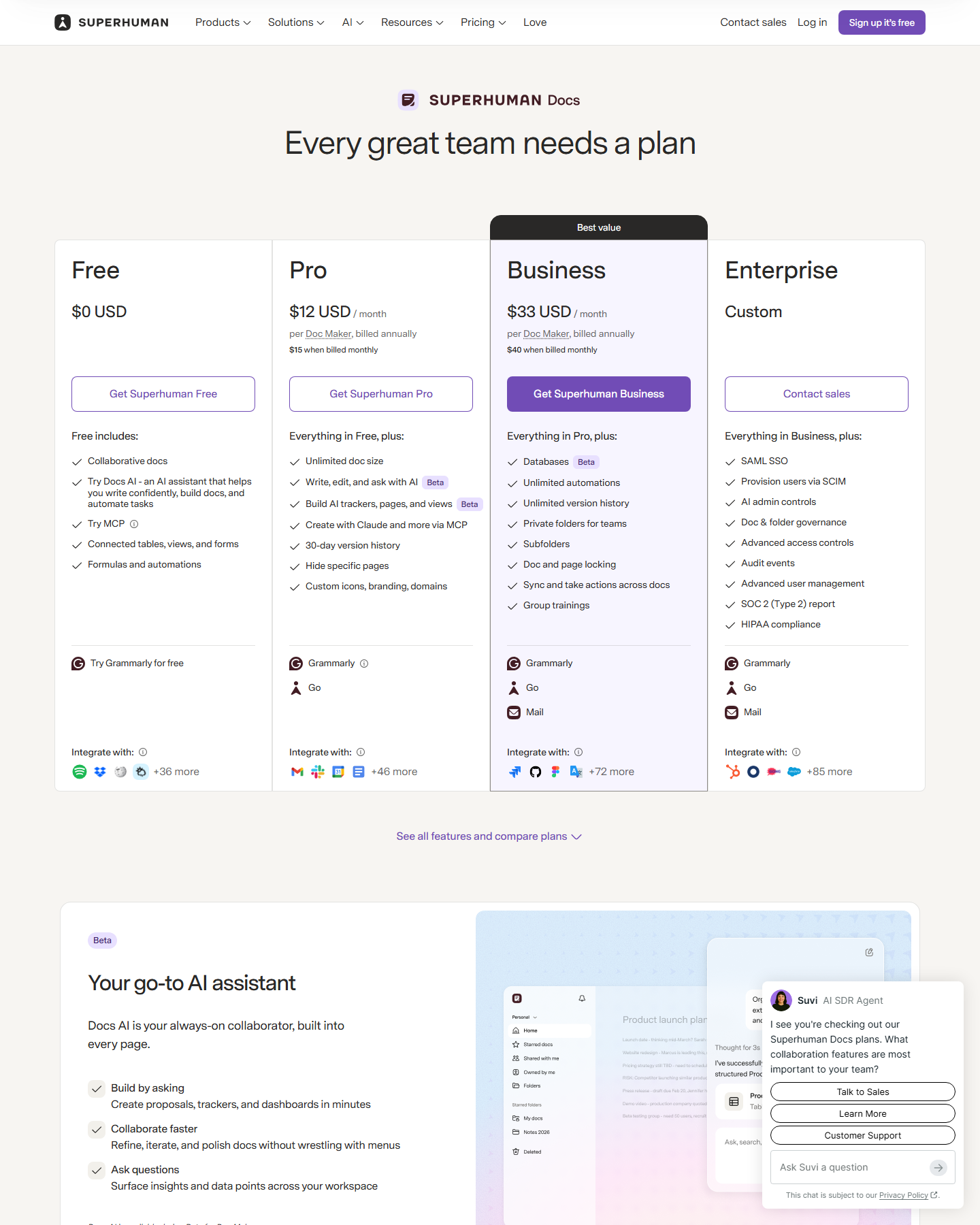
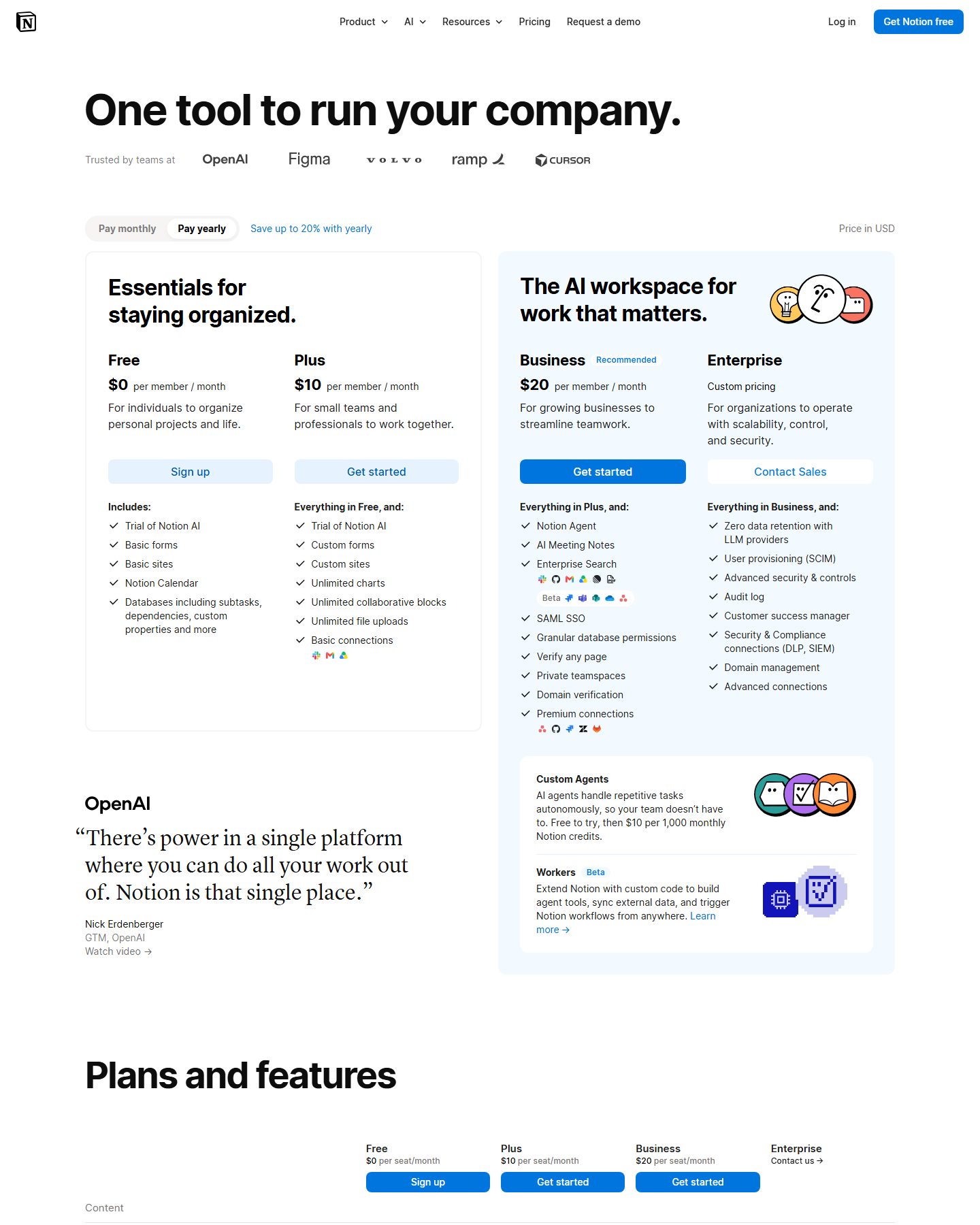
Terms comparison from both official pricing pages, captured in USD on October 4, 2026. No accounts were created.
One thing to know before anything else: coda.io/pricing now redirects to superhuman.com/plans, and the page you land on is branded Superhuman, selling Coda’s doc-and-table product as part of a suite alongside Mail and Agents. The pricing below is what that page showed on October 4, 2026, and it is priced per Doc Maker rather than per seat.
Pricing side by side
| Notion | Coda | |
|---|---|---|
| Free | $0, unlimited pages, 5 MB/file, 10 guests | Free $0 — collaborative docs, connected tables/views/forms, formulas and automations |
| Entry paid | Plus $10/member/mo yearly · $12 monthly | Pro $12 per Doc Maker/mo yearly · $15 monthly |
| Upper paid | Business $20 yearly · $24 monthly | Business $33 per Doc Maker/mo yearly · $40 monthly |
| Billing unit | Member (guests free on paid plans) | Doc Maker — only people who build |
| AI | Trial on Free and Plus; full from Business | Write, edit and ask with AI from Pro; build trackers, pages and views; connect Claude via MCP |
| Team features | Databases, dashboards, forms | Databases (Business), private folders, subfolders, doc/page locking, sync |
The Doc Maker model changes the arithmetic
This is the part worth pausing on. Coda does not charge per reader — it charges per Doc Maker, meaning people who build documents. On Notion, guests are free on every paid plan.
So the same workspace of 4 people who edit and 30 people who only read costs:
- Notion Plus: 4 × $10 = $40/mo
- Coda Pro: 4 × $12 = $48/mo — or less if some of those four don’t build anything
If most of your workspace only reads, Coda’s number is the smaller one; if everyone builds, Coda is the more expensive of the two.
Where Coda is genuinely different
Coda’s pitch is that a document can be a small application: connected tables with views and forms, formulas, automations, and buttons that act on data. The Free plan includes docs, tables with views and forms, formulas and automations — so the core model is not paywalled. Pro adds unlimited doc size, AI write/edit/ask, version history (30 days), page hiding, custom icons, branding and domains. Business at $33 adds databases, unlimited automations, unlimited version history, private folders, subfolders, and doc/page locking.
Notion’s equivalent progression runs the other direction: unlimited pages and blocks are free-tier, Plus adds file uploads and charts, and Business adds Notion Agent, AI Meeting Notes, Enterprise Search, SAML SSO and granular database permissions.
Verdict
Coda is not cheaper than Notion — Pro at $12 per Doc Maker is more than Plus at $10 per member, and Business at $33 is well past Notion’s $20. Its case is shape, not price: if your workspace is really a handful of document-as-app tools with formulas and buttons, Coda models that better than Notion databases do.
Notion Plus is the better-value workspace at $10 with unlimited pages, free guests on paid plans, and a broader feature surface. Its one structural weakness remains that AI starts at $20 — see Notion AI pricing.
For the wider field: Notion alternatives and Notion vs Craft for the document-design end.
Pricing verified against coda.io/pricing (which redirects to superhuman.com/plans) and notion.com/pricing on October 4, 2026. Coda’s ownership and plan names have changed during 2026 — check the live page before purchase.