The short version
Checked against the live Zapier pricing page on 2026-09-15 (proxied browser session, USD state, the Monthly/Yearly control exercised; all dollar amounts below are in the page’s own text layer, not images):
- Free — $0: 100 tasks per month, “Unlimited Zap workflows, Tables, and Forms” but two-step Zap workflows only (one trigger, one action), plus Zapier Copilot with an asterisk. Unlimited count of Zaps, hard cap on what each Zap can do.
- Professional — starting from $19.99/mo billed yearly / $29.99/mo billed monthly: multi-step Zaps, unlimited premium apps, webhooks, AI fields, conditional form logic, email and live-chat support.
- Team — starting from $69/mo yearly / $103.50/mo monthly: up to 25 users, shared Zaps/folders/app connections, SAML SSO, priority support.
- Enterprise — custom quote: unlimited users, advanced admin controls, annual task limits, observability, technical account manager.
- Task sliders on the page offer 100 / 2K / 10K / 100K / 1M / 2M tiers; every paid tier is “starting from” — the real price depends on the task volume you select.
This is a terms check, not a hands-on test — we captured and toggled the page but did not build Zaps on a Zapier account.
The billing mechanic that surprises people: overage is on by default
The pricing page’s own wording, under “Our commitment to flexible, risk-free pricing”:
“Pick any task tier, and if you reach your limit, you’ll be switched to pay-as-you-go unless you turn it off or move up to a higher tier.”
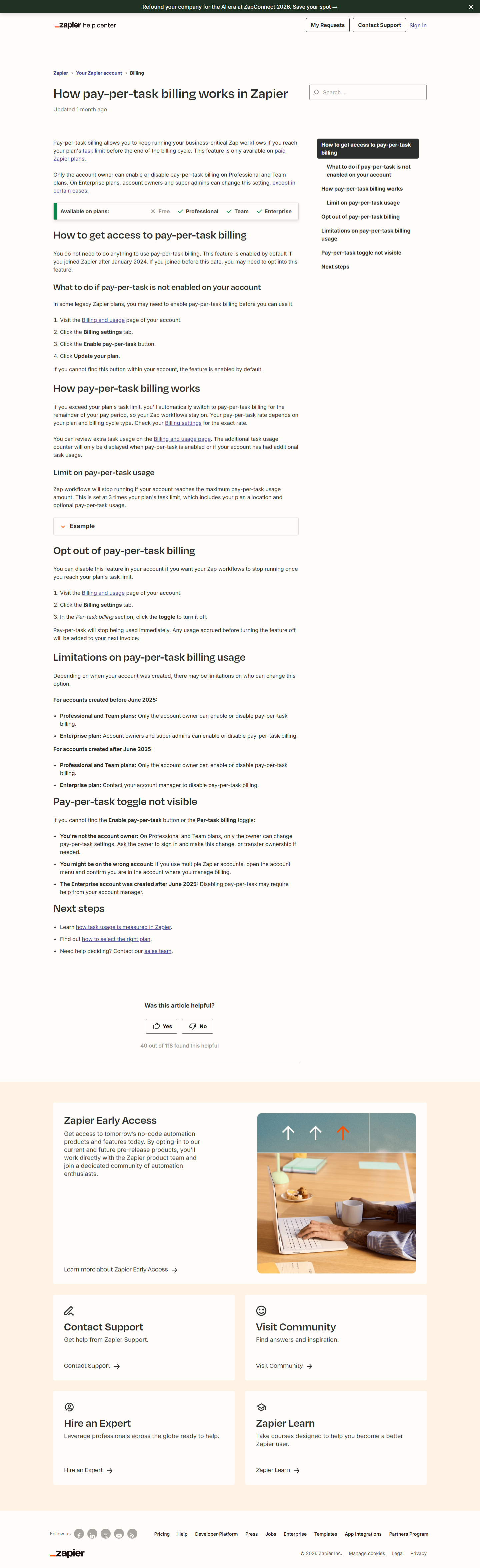
And Zapier’s help center (“How pay-per-task billing works in Zapier”, captured the same day):
“If you exceed your plan’s task limit, you’ll automatically switch to pay-per-task billing for the remainder of your pay period, so your Zap workflows stay on.”
Three consequences worth spelling out:
- On paid plans, hitting the limit does not stop your automations — it starts metered billing. That is friendlier than a hard pause, but it means the subscription price is a floor, not a ceiling, unless you actively disable the switch.
- There is a guardrail: pay-per-task usage caps at 3x your plan’s task limit (plan allocation + pay-per-task combined), after which Zaps pause until the next cycle.
- Pay-per-task is only available on paid plans — on Free, the 100th task is a wall, not a meter.
Email notifications fire as you approach and reach the limits, but the default-on posture is the single most important thing to know before recommending Zapier to a budget-conscious team.
One task pool for everything — a 2026 pricing change
A banner on the page (captured 2026-09-15) announces: “New: Your pricing works the same way everywhere you use Zapier. AI steps, code, and SDK now all follow the same task-based pricing model.” The FAQ section adds detail: every step in a Zap and every external connector call consumes tasks, AI model tier, code runtime and connector type each change how many, and Zaps, AI steps, code, MCP and SDK all draw from one shared allocation with no separate budgets.
Practical read: “100 tasks” on Free is not 100 automations — a multi-action, AI-heavy workflow can burn several tasks per run. Third-party trackers price the Professional base tier at 750 tasks/month ($19.99/$29.99 starting prices, 2026), which matches the “starting from” labeling; the exact task count per tier is chosen in the page’s slider, not printed per card.
The monthly premium: an honest 50%, and a “Save 33%” label that checks out
| Professional | Team | |
|---|---|---|
| Yearly | $19.99/mo | $69/mo |
| Monthly | $29.99/mo | $103.50/mo |
| Monthly premium | +50.0% | +50.0% |
| Realized yearly saving | 33.3% | 33.3% |
The toggle reads “Pay yearly (Save 33%)” and the two captured states compute to exactly 33.3% on both tiers — a label that does what it says. (For comparison, our ClickUp capture found a “Save up to 30%” label that Business actually beats at 36.8%, and Jotform’s “up to 20%” ranged 12.8–23.3%. Zapier’s math is the clean one.) We put the full discount arithmetic next to PhantomBuster’s in our PhantomBuster vs Zapier comparison — including the two different $69 entry points.
Note both paid cards say starting from: the premium tiers with 2K+ tasks cost more on both billing cycles, so $19.99/$69 are entry points for the smallest task buckets, not your bill if you automate heavily.
What the free plan is genuinely good for
The Free card is unusually specific, so we can quote it directly: unlimited workflows (including Tables and Forms), two-step only, 100 tasks/month. A single-trigger → single-action Zap that runs ~3 times a day fits inside the free allowance indefinitely; anything with a filter, formatter, branch, or second action step needs Professional — filters and paths are steps, and steps are what separate the tiers here more than features. Zapier’s own 9,000+ app catalog and MCP/SDK access are present in the page text as platform-wide claims (9,000+ apps mentioned in the SDK blurb).
Is Zapier safe?
Checked against zapier.com/legal/data-privacy on 2026-09-29:
- Zapier holds independent SOC 2 Type 2 and SOC 3 attestations (AICPA trust services criteria); its data-privacy page points to a dedicated security & compliance page, and the SOC 2 report is available under NDA through Zapier’s Get Help page.
- Privacy frameworks: certified under the EU-US Data Privacy Framework, the UK Extension, and the Swiss-US DPF, with GDPR, UK GDPR, and CCPA processes described on the same page; a Data Processing Addendum is published for customers.
- One hard boundary worth knowing before you connect anything: Zapier explicitly does not support PHI under HIPAA and will not sign business associate agreements (BAAs).
- The page also states Zapier runs internal data audits and vendor audits on an ongoing basis.
Practical read: SOC 2 Type 2 plus DPF certification is a solid baseline for business automation; the PHI exclusion is the boundary to check if a connected app touches regulated healthcare data.
Verdict (terms-level, no score)
We did not run workflows on a Zapier account, so no star rating. On the terms alone: Zapier prices are fully text-layer verifiable (Typeform’s were not in our 2026-09-14 capture — its price digits flicker between rendered and client-bound, and were back as page text by 2026-09-26; see our Typeform pricing piece), the yearly-discount label is honest, and the free plan is a real sandbox — but it is shaped like a demo: 100 tasks and a hard two-step cap. The two things to decide before buying are (a) which task tier your volume actually needs, since every paid card is “starting from,” and (b) whether you want auto pay-per-task on; budget owners should turn it off or set the 3x cap in their calendar. Automation is priced per action here, not per user (until the Team tier’s 25-user cap), which flips the comparison logic against seat-billed tools.
Methodology & sources
- zapier.com/pricing — captured 2026-09-15 (UTC, through the local egress proxy) in a headless Chrome session: full rendered text and full-page screenshot in the default yearly state and after exercising the “Pay monthly” control. Primary source for all plan prices, feature lists, task-slider values and the shared-task-pool / pay-as-you-go wording. The page presented USD without intervention on this capture (no currency switch needed, unlike our Figma/Brevo/Mailchimp captures).
- help.zapier.com — “How pay-per-task billing works in Zapier”, captured 2026-09-15: the automatic-switch wording and the 3x maximum-usage rule.
- Task counts per paid tier (e.g. Professional base = 750 tasks/mo) are not printed per card on the pricing page; cross-checked against two independent 2026 trackers (nocode.mba, lindy.ai) — treated as secondary and flagged as such wherever cited.
- Free-tier two-step and 100-task limits are the page’s own text (“Two-step Zap workflows” feature line; “(100 tasks per month)”).
- Checked 2026-09-15. Pricing pages change; re-verify before citing.
Related guides
More of our Zapier guides: