The short version
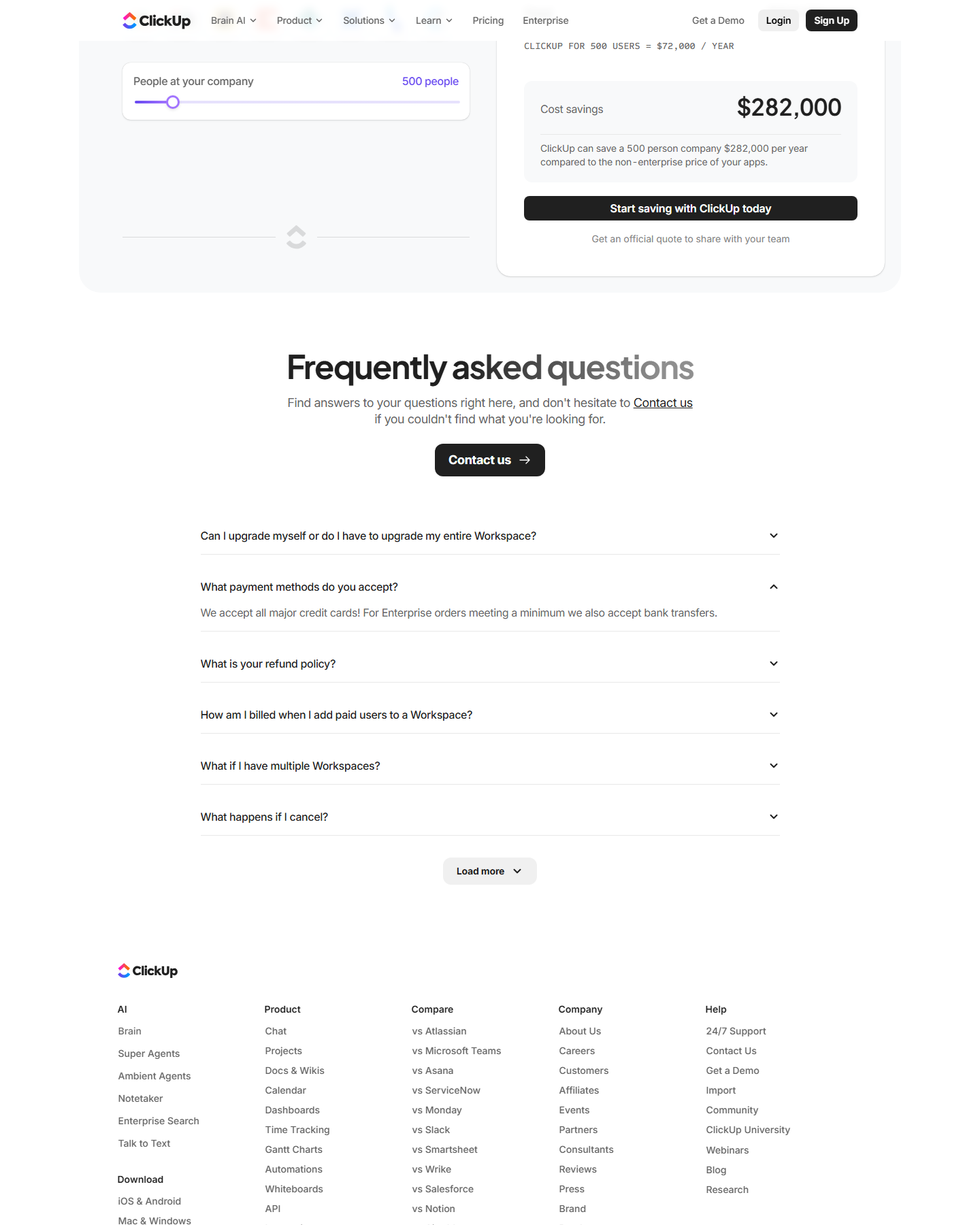
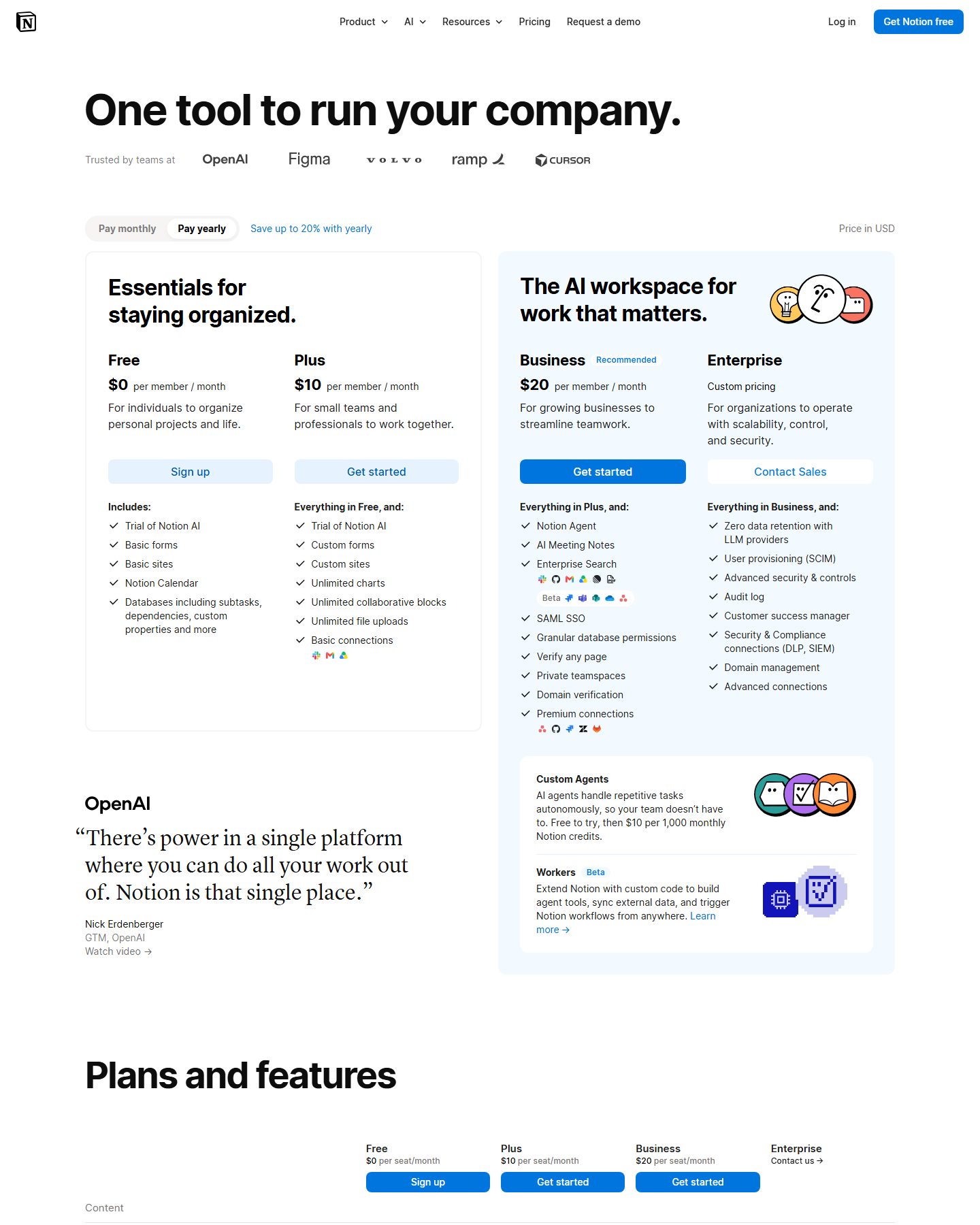
Terms comparison from both official pricing pages, captured in USD on October 4, 2026. No account was created on either product.
Both products want to be the team’s one workspace, and both bill per person. The difference is where the price floor sits and how it grows: ClickUp’s free plan has unlimited members, Notion’s free plan stops being generous the moment a second person joins.
Pricing side by side
| Notion | ClickUp | |
|---|---|---|
| Free | $0 — blocks limited once 2+ members | $0 Free Forever, unlimited members, 60 MB storage |
| Entry paid | Plus $10/member/mo yearly · $12 monthly | Unlimited $7/user/mo yearly · $10 monthly |
| Business tier | Business $20 yearly · $24 monthly | Business $12 yearly · $19 monthly |
| Enterprise | Custom | Custom |
| Storage | Free plan: 5 MB per file; paid: unlimited (~5 GB/file) | Free: 60 MB; Unlimited+: unlimited |
| AI | Trial on Free and Plus; full from Business | Listed as available on Unlimited and above |
| Guests | 10 free on Free, unlimited on paid | Guests with permission control from Unlimited |
Two numbers decide this. ClickUp Unlimited at $7 undercuts Notion Plus by $3 per user, and Notion’s own comparison table marks its file uploads as “Up to 5 MB” on Free versus ClickUp’s 60 MB. If you are moving off Notion purely on price, ClickUp is the direct answer and nothing else in the category matches the free tier.
What each free plan is actually good for
Notion’s free plan is a genuinely excellent solo tool: unlimited pages, databases, 7 days of page history, calendar connections, and 10 free guests. Its two ceilings are on the pricing page — uploads cap at 5 MB per file, and blocks are only unlimited while you’re the only member. The moment you invite a colleague, the collaborative tier starts mattering.
ClickUp’s free plan is a different bet: “Free Forever” with unlimited tasks and unlimited Free Plan Members, 60 MB of storage, two-factor authentication, collaborative docs, Kanban boards, sprint management, and calendar view. Unlimited members is the headline — a 30-person team can evaluate ClickUp at zero cost. What $0 does not include is unlimited storage, custom fields, native time tracking, or integrations.
Where the feature weight sits
ClickUp’s Unlimited tier at $7 lists unlimited spaces, folders and forms, unlimited Gantt charts, unlimited integrations and storage, native time tracking, goals and portfolio management, and ClickUp Chat. Its Business tier at $12 adds dashboards, message history, webhooks and automation integrations, 5,000 automations per month, mind mapping, private whiteboards, and Google SSO.
Notion’s Plus at $10 removes Notion branding from public forms, adds custom forms and sites, database charts, unlimited file uploads, and basic connections. Its Business tier at $20 is where Notion Agent, AI Meeting Notes, Enterprise Search, SAML SSO, granular database permissions and private teamspaces appear.
Read that list carefully: Notion’s meaningful automation and AI features start at $20 per member, while ClickUp’s automation allowance starts at $7. A team that needs heavy automation pays less on ClickUp at every tier.
What it costs a real team
- 8 editors, no AI needed: Notion Plus $80/mo. ClickUp Unlimited $56/mo.
- 8 editors, AI needed: Notion Business $160/mo — this is Notion’s first tier with real AI, not a trial. ClickUp Business $96/mo, where AI is already included.
- 40 readers, 8 editors: Notion bills members but guests are free on paid plans, so still $80. ClickUp bills users; its guest allowance sits on Unlimited and above, so this needs care.
- Solo, forever: Notion Free is fine until you invite someone. ClickUp Free is fine at any headcount.
Verdict
ClickUp wins on price at every tier and wins outright on the free plan’s member count. Notion wins on the things a workspace does that a task manager doesn’t: linked database views, a real document editor, and free unlimited guests on paid plans.
If your objection to Notion is the seat price, ClickUp Unlimited at $7 is the shortest path. If your objection is that you keep rebuilding the same linked databases by hand, stay — and read Notion pricing for the tier detail and Notion alternatives for the wider field.
Pricing verified against clickup.com/pricing and notion.com/pricing on October 4, 2026.