The short version
This comparison is built from the two vendors’ own pricing pages, both captured on 2026-09-14 — Figma’s page was captured in USD after manually switching its currency control away from the geo-default JPY (see the Figma terms check for how that works), and Penpot’s cloud and self-host sections were captured in the same session (full numbers in our Penpot terms check). It is a terms comparison: we did not create a team or design a file on either platform.
Three structural differences decide the bill:
- Figma sells three different seats; Penpot sells one kind of member. On Figma Professional a Full seat is $16/mo yearly ($20 monthly), a Dev seat is $12 ($15), a Collab seat is $3 ($5). On Penpot everyone on a cloud plan gets the same fully featured access; the only question is free tier vs paid.
- Developer handoff is the sharpest price gap. Figma’s full Dev Mode lives on a paid Dev seat ($12–15/mo); Penpot lists Inspect mode and Devtools (code inspector, properties, measurement, production-asset export) under “included in every plan,” including free.
- Free ceilings are shaped differently. Figma’s Starter is per-designer (unlimited personal drafts, 150 AI credits/day); Penpot’s free Professional is a team tier — up to 8 members plus unlimited viewers, 10 GB, unlimited files and teams. Above 8 people, Penpot’s $7/seat bill is hard-capped at $175/month; Figma bills every seat with no team-size cap.
Pricing side by side
Figma (USD, captured 2026-09-14):
| Starter | Professional (Full / Dev / Collab) | Organization | Enterprise | |
|---|---|---|---|---|
| Yearly per seat | $0 | $16 / $12 / $3 | $55 / $25 / $5 | $90 / $35 / $5 |
| Monthly per seat | $0 | $20 / $15 / $5 | annual-only | annual-only |
| Access shape | unlimited personal drafts; 150 AI credits/day (500/mo cap) | all Figma products on Full; Dev Mode on Dev; FigJam/Slides/Buzz + view-only design on Collab | SSO, org-wide libraries, multi-team admin | SCIM, advanced security, enterprise support |
Penpot (captured 2026-09-14):
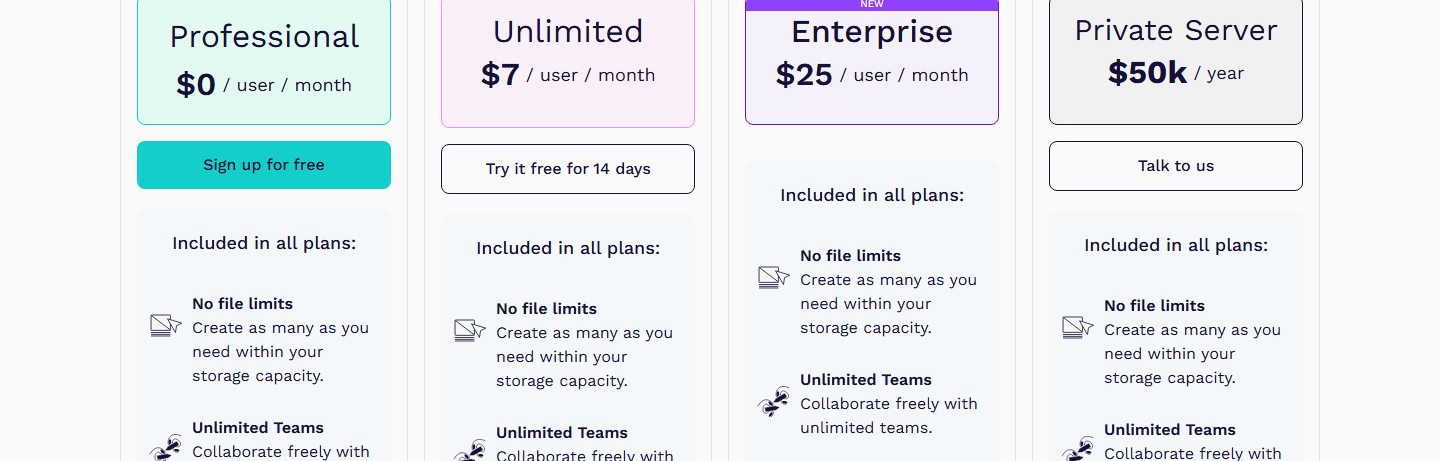
| Professional (cloud) | Unlimited (cloud) | Enterprise (cloud) | Self-host | |
|---|---|---|---|---|
| Price | $0 | $7/user/mo, bill capped at $175/mo | $25/user/mo | free forever / Enterprise self-host $25 / Private Server $50k/yr |
| Members | up to 8, unlimited viewers | unlimited | unlimited | your infrastructure |
| Storage / history | 10 GB / 7 days | 25 GB / 30 days | unlimited / 90 days | n/a |
| Core features | “no file limits,” Inspect + Devtools, prototypes, libraries, plugins, API, Webhooks | same, plus early features | + SSO, audit logs, org admin, SCIM | same software, you run it |
What the seat model does to a real team bill
Worked example, yearly USD, a product team of 4 designers + 6 developers + 2 stakeholders who only comment:
- Figma: the designers need Full seats (4 × $16 = $64); developers using full Dev Mode need Dev seats (6 × $12 = $72); the two stakeholders can be free viewers if they only view and comment (Figma: “let others view and comment on your files without purchasing extra seats”), otherwise Collab is 2 × $3 = $6. The paid floor here is $136/mo once developers need Dev Mode — and every additional developer adds $12.
- Penpot: all 12 people — but the free Professional tier covers 8 members with the same editor and Devtools everyone else gets. Four members go on Unlimited at $7 = $28/mo, and the bill stops growing at $175/mo regardless of headcount. Developers cost nothing extra because Devtools is in the free feature set.
The asymmetry is the business model: Figma monetizes per role (a viewer is free, but a developer inspecting code is a seat), while Penpot monetizes per team size / governance (the software is the same at every tier; you pay for more members, storage, history, SSO and audit).
Where Figma still wins on the terms
- Mature platform breadth. AI credits are priced per seat type (3,000/mo on a Professional Full seat vs 500 on Dev/Collab), and Figma’s current products span Design, Make, Draw, Sites, Dev Mode, FigJam, Slides and Buzz — the two betas (Motion, Sites) are Full-seat only. Penpot lists AI Workflows via any Agent/LLM, but the feature surface on the pricing page is narrower.
- No self-management at any paid tier. Every Figma plan is hosted; Penpot’s “free forever at scale” route requires running Docker/Kubernetes yourself (Enterprise self-host and the $50k Private Server exist for teams that want open-source deployment without operating it).
- Enterprise governance is older and deeper in the market (SCIM, audit logs, multi-brand systems), though Penpot’s Enterprise lists the same headline items at $25/seat vs Figma’s $90/seat for Full.
Where Penpot wins on the terms
- Free is a team tier, not a trial. 8 real members, unlimited viewers, unlimited files and teams, 10 GB, and the same Inspect/Devtools the paid plans include.
- The Devtools wall does not exist. Code inspector, properties, distances, component annotations, production-asset export — free. On Figma, that workflow is a $12–15/seat/month Dev seat per developer.
- Price predictability. $7/seat with a written $175/month ceiling; open-source with no vendor lock-in (“You own your designs and code,” printed on every plan card); self-host for free if you can run it.
- One honest caveat we observed: Penpot’s live pricing page carried the same stray string
askjdkjdhlkjdhldskjhasldjhdfslinside four plan descriptions on our 2026-09-14 capture (visible in our Penpot review evidence) — a page-maintenance blemish, not a pricing issue, but exactly the kind of thing worth checking before you quote the page to a procurement team.
Who should pick which (terms-level)
- Pick Penpot if your team is ≤8 people, developers need inspect/export and you want that at $0; you value open-source/self-hosting and data ownership; or you want a bill with a hard cap.
- Pick Figma if the team already runs on Figma’s ecosystem (Make, FigJam, Slides, AI credits at volume), stakeholders need polished Collab-only seats, or you need the incumbent’s mature enterprise procurement story — and accept that every developer with full Dev Mode is a paid seat.
This is terms-level analysis with no star rating on either side (we built no files in either product). For the full single-tool breakdowns see our Figma review and Penpot review.
Methodology & sources
- figma.com/pricing — captured 2026-09-14 in a real Chrome session, USD yearly and monthly states after manually switching the page currency control from its geo-default JPY (aria-label verified both billing states); evidence in /reviews/figma-review/.
- penpot.app/pricing — captured 2026-09-14 in the same session: Cloud tab (all four plans), free-card crop, and the self-host section; evidence in /reviews/penpot-review/.
- Cross-references: our single-product terms checks for Figma and Penpot. Team-bill math above is computed from per-seat prices on those captures, not quoted from a third-party calculator.
- Checked 2026-09-14. Pricing pages change; re-verify before committing a budget.