The short version
Checked against two official Figma Help articles and the live pricing page on 2026-10-15, in a not-logged-in session. No credits were spent, so this is a documentation/terms read.
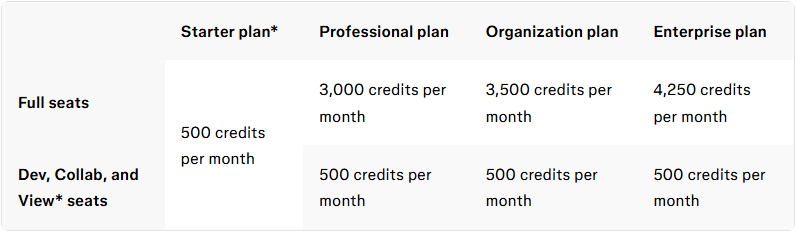
One number that matters more than the plan names: Figma AI runs on a single shared credit pool per seat, used across Figma Make, AI image editing, FigJam AI and the agent features. Your allotment depends on plan and seat type:
| Starter | Professional | Organization | Enterprise | |
|---|---|---|---|---|
| Full seats | 500/mo + 150/day cap | 3,000/mo | 3,500/mo | 4,250/mo |
| Dev / Collab / View seats | 500/mo (View also 150/day) | 500/mo | 500/mo | 500/mo |
Two rules shape budgeting: credits reset monthly and do not roll over, and the allotments are explicitly “subject to change” per Figma’s own fine print.
What actually burns credits (per-use rates)
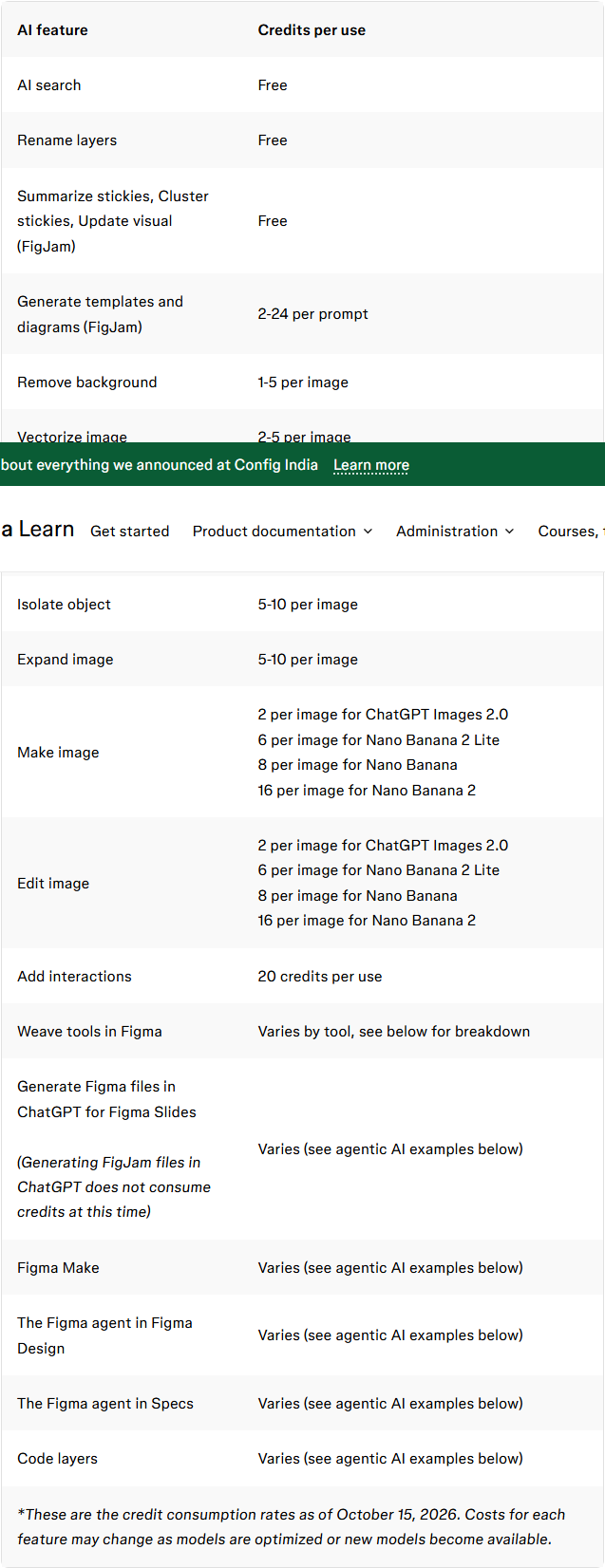
From the official per-use table:
| AI feature | Cost |
|---|---|
| AI search, rename layers, FigJam stickies (summarize/cluster/update) | Free |
| Generate templates & diagrams (FigJam) | 2–24 per prompt |
| Remove background | 1–5 per image |
| Vectorize image | 2–5 per image |
| Boost resolution / erase / isolate / expand | 5–10 per image |
| Figma Make (plan mode) | Planning is a separate charge from the build; both consume credits |
The practical read: image-utility actions are cheap (single digits), agentic work is where the pool goes. Figma’s own words: “Processing more context… can increase credit consumption, especially in chats with extensive history.” A 3,000-credit Professional Full seat is generous for occasional image work and thin for a designer who iterates Make builds all day — Figma does not publish a fixed credits-per-build figure, so budget by observed consumption in your own workspace.
Time-boxed detail (checked 2026-10-15): Figma’s “code layers” feature consumes AI credits in open beta, but generation/editing inside code layers is free through November 4, 2026 on paid plans (announced at Config India 2026); after that it bills like other agentic features.
Where the pool runs out, and how to buy more
- Monthly reset, no rollover. Hit the monthly limit and AI features that require credits stop working until the next reset date (official wording, Education-plan article).
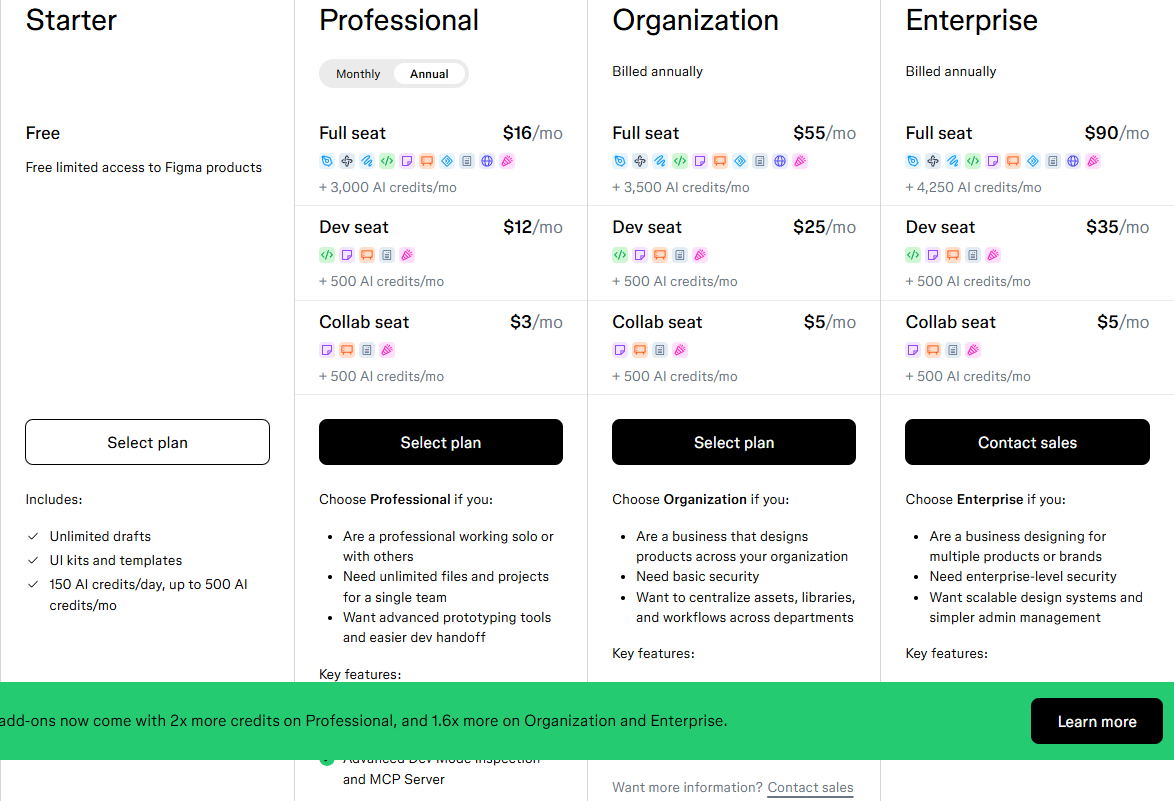
- Paid plans can purchase additional AI credits. On Organization and Enterprise, the AI-credit subscription is annual, aligned to your Figma contract term, and downgrades/cancellations are only possible in the 30-day renewal window. The pricing page’s banner as of 2026-10-15: paid AI add-ons “come with 2x more credits on Professional, and 1.6x more on Organization and Enterprise”.
- Admins can set individual credit limits (or disable paid-credit access per user); Enterprise adds billing-group management and an AI Usage API (per-user, per-day credit consumption, up to a year of data).
- Free/Starter users: the 150-credit daily cap means you can use some credits every day, but the pool tops out at 500/month.
What this page does not cover
We did not log in, generate anything, or spend a credit. Figures are exactly what Figma’s Help Center and pricing page state as of 2026-10-15. Figma also carries a standing note that “some updates to AI credits” were recently announced — re-check the linked articles before budgeting a team rollout.
Related pages
Credits sit on top of the seat price, so the seat pages are worth reading next figma review — what a full Figma seat costs once the base plan is priced; figma vs penpot — Penpot as the free, self-hosted alternative; notion ai pricing — Notion’s AI add-on, priced per member for comparison.
Sources
- Figma Help Center: How Figma AI credits work and Manage AI credits, both read 2026-10-15 (not logged in; no credits consumed).
- figma.com/pricing, AI-credit block per plan, read 2026-10-15 with currency set to USD.
- Figma Help Center: What’s new from Config India 2026 (code layers free-through-Nov-4-2026 window), AI credits on the Education plan (3,000/mo Education, no rollover wording).